
1. What is MQTT
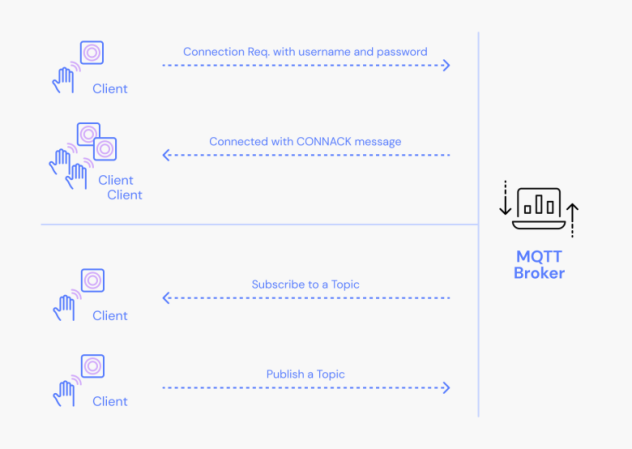
MQTT is an open-source pub/sub communication protocol. It is efficient in its utilization of bandwidth and system resources. As a result, it is popular in use cases ranging from low-powered embedded systems to cloud-native micro services.
The pub/sub model is at the core of MQTT communication. Information is organized by topics. Client devices can publish data to a topic to send messages to any subscribers. Similarly, clients can subscribe to a topic to be notified when a message is published.
2. MQTT Topics on the Camera
There are 5 Topics on the camera:
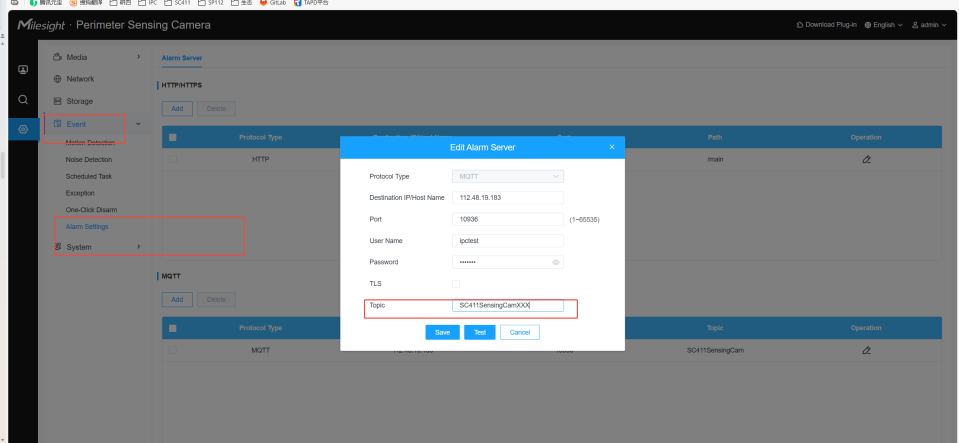
“Alarm Topic”:SC411SensingCamXXX
“Result Topic”:SC411SensingCamXXX/result
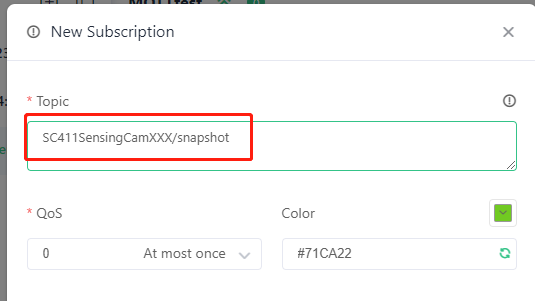
“Snapshot Topic”:SC411SensingCamXXX/snapshot
“Record Topic”:SC411SensingCamXXX/record
“Status Topic”:SC411SensingCamXXX/status
“Message Topic”:SC411SensingCamXXX/message
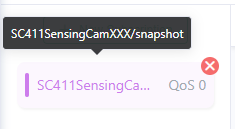
You can set a default prefix for a topic on the web page. For example, if you configure SC411SensingCamXXX on the web page, the actual MQTT topics will be as follows in your MQTT server configuration(as snapshot topic in MQTTX for a example):
Note: The prefix for the "Wake Topic" is SC411SensingCam/wake/mac address and is not affected by changes to the topic prefix.
3. Application on the Camera
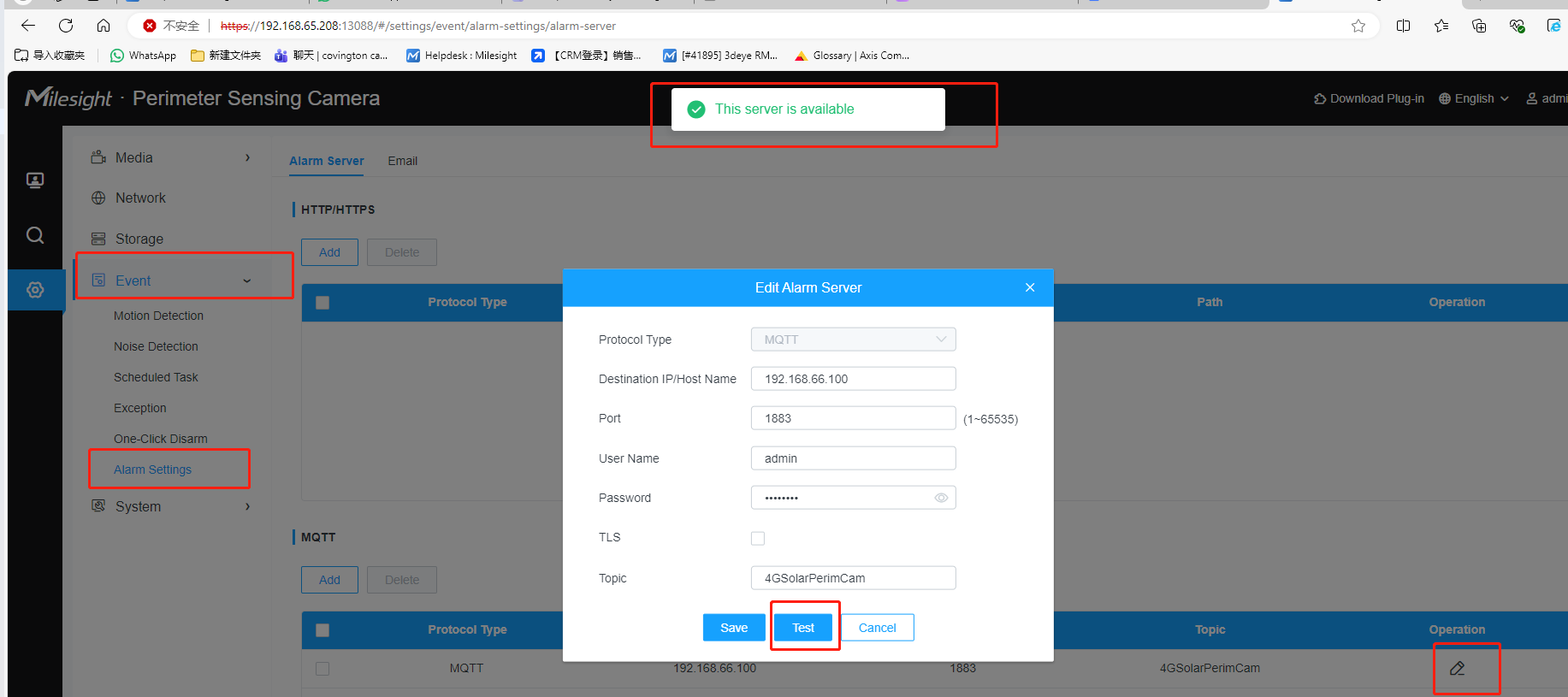
1.First, add the MQTT/HTTP server in the Alarm Settings.
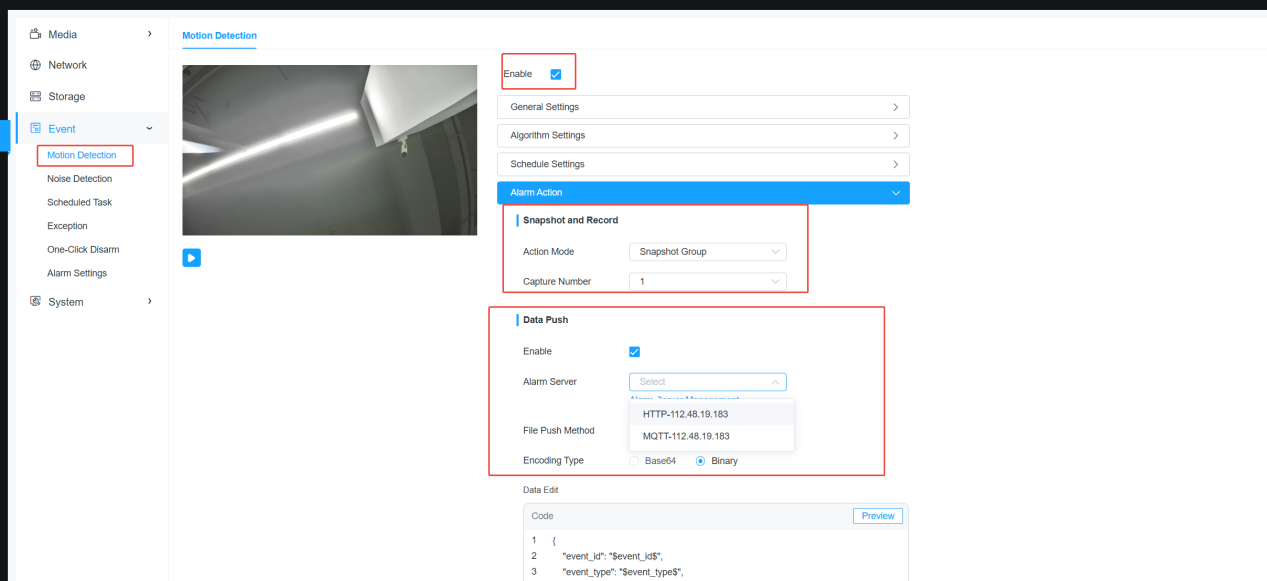
A. Enable event alarm.
B. Configure event snapshot and recording settings.
C. Enable “Data Push”.
D. Select the “Alarm Server”.
E. Choose the “File Push Method”.
F. If "File Push Method" is set to "General", you can also select the Encoding Type.
G. In “Data Edit”, you can edit the alarm template and preview the sample alarm data by clicking "Preview".
2.Each event has its own Enable button and Alarm Action settings, which can be configured under the relevant event, such as motion detection.
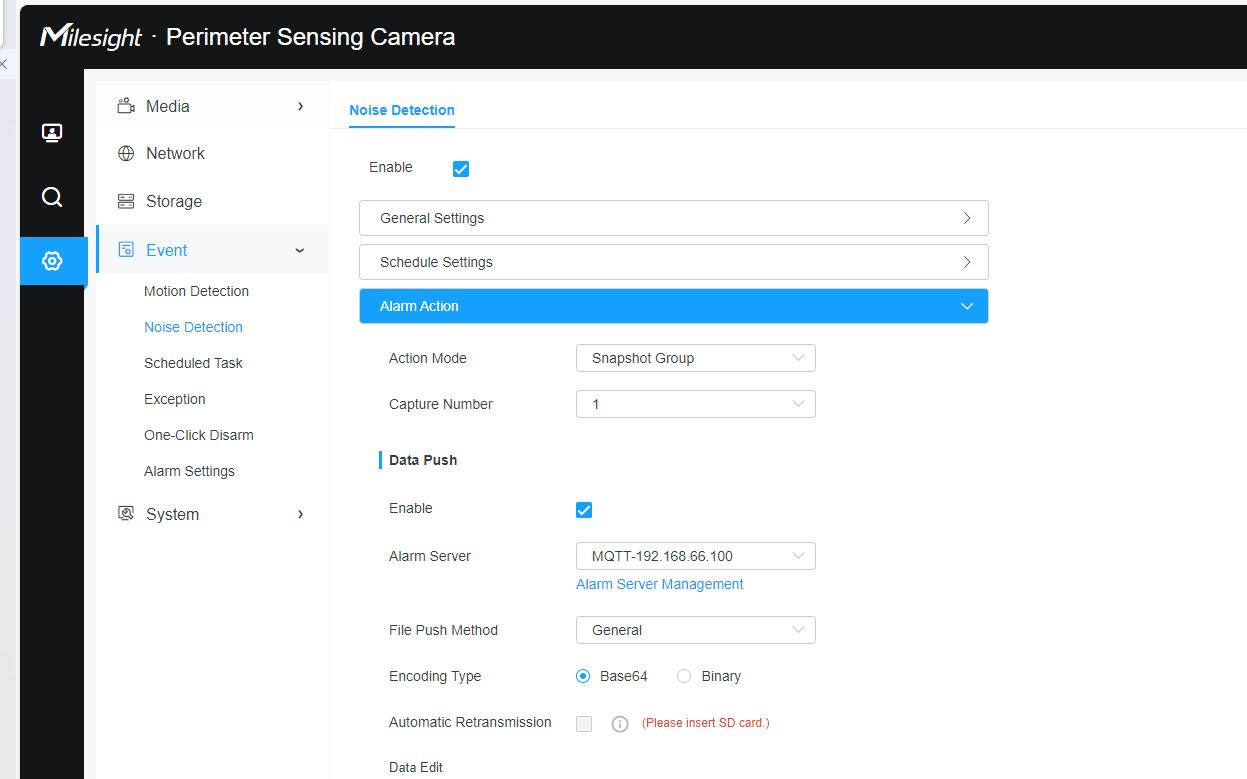
The available Encoding Types are: Base64 and Binary. (Base64 is only supported when uploading snapshots for alarms.)
Note: To adapt to weak wireless network environments, when Encoding Type is set to Binary, snapshots or recordings are uploaded using file chunking. This prevents the need to re-upload the entire file in case of transmission failure.
4. Topic Description
4.1 Alarm Topic
• Client needs to subscribe to the “Alarm Topic”.
• Camera sends active alarms to this topic.
• Client parses the content after receiving it.
Feedback Data sample:
{
"event_id": "1759024551056",
"event_type": "Motion Detection",
"device_name": "Perimeter Sensing Camera",
"mac_address": "1C:C3:16:54:3F:48",
"sn": "ipc",
"latitude": "24.624960",
"longitude": "118.030720",
"altitude": "103",
"time": "2025-09-28 09:55:51",
"time_msec": "2025-09-28 09:55:51.053",
"retransmit_time": "-",
"retransmit_count": 0,
"detection_region": 0,
"detection_region_name": "Entire Region",
"resolution_width": 2688,
"resolution_height": 1520,
"coordinate_x1": 944,
"coordinate_y1": 649,
"coordinate_x2": 1955,
"coordinate_y2": 1513,
"snapshot": [{"index": 0, "filename": "20250928095551_1759024551056_MotionDetection_0.jpg"}]
}
All alarms upload the following fields:
• "event_id": Event ID
• "event_type": Event type
• "device_name": Device name
• "mac_address": Device WiFi MAC address
• "sn": Device serial number
• "latitude": GPS latitude, in degrees (°)
• "longitude": GPS longitude, in degrees (°)
• "altitude": GPS altitude, in meters
• "time": Event trigger time
• "time_msec": Event trigger time, accurate to milliseconds
• "retransmit_time": "-", Event retransmit time, use "-" for the first alarm
• "retransmit_count": 0, Event retransmit count, use 0 for the first alarm
Different "event_type" values may include additional fields:
"Motion Detection", providing the following additional fields:
• "detection_region": Detection region ID
• "detection_region_name": Detection region name
• "resolution_width": Image width
• "resolution_height": Image height
• "coordinate_x1": Object's starting position on the X-axis in the image
• "coordinate_y1": Object's starting position on the Y-axis in the image
• "coordinate_x2": Object's ending position on the X-axis in the image
• "coordinate_y2": Object's ending position on the Y-axis in the image
1. "Noise Detection"
No additional fields provided.
2."Scheduled Task"
No additional fields provided.
3."Tamper Detection"
No additional fields provided.
4."No SD Card", "SD Card Uninitialized", "SD Card Full", "SD Card Error"
No additional fields provided.
5."Low Power", "Low Battery Health", "Battery Malfunction"
"battery_level": Built-in battery level, range 0~100
"battery_health": Built-in battery health, range 0~100
6."Data Usage Alert"
"plan_type": Cellular data billing cycle, values: "Daily", "Monthly", "Annually"
"data_plan": Total cellular data plan
"data_usage": Cellular data usage
7."PIR Overtrigger Alert"
"trigger_value": PIR overtrigger threshold, indicates the number of PIR triggers in the past hour
4.2 Result Topic
• Client needs to subscribe to the “Result Topic”.
• Camera sends active alarms to this topic.
• Client parses the content after receiving it.
If “AWS S3” is selected as the File Push Method in the camera’s Alarm Action, after the file is successfully uploaded to S3, a detailed push result will be sent to the “Result Topic”.
Feedback Data sample:
{
"type": "alarmUploadResult",
"event_id": "1759024551056",
"event_type": "Motion Detection",
"mac_address": "1C:C3:16:54:3F:48",
"snapshot": [
{
"index": 0,
"method": "PUT",
"filename": "http://192.168.63.174:10922/main/snapshot.jpg",
"result": "fail",
"reason": "curl res: 7"
}
],
"video_clip": {
"index": 0,
"method": "PUT",
"filename": "http://192.168.63.174:10922/main/snapshot.mp4",
"result": "fail",
"reason": "curl res: 7"
}
}
}
success result:
{
"type": "alarmUploadResult",
"event_id": "1759024551056",
"event_type": "Motion Detection",
"mac_address": "1C:C3:16:54:3F:48",
"snapshot": [
{
"index": 0,
"method": "PUT",
"filename": "http://192.168.63.174:10922/main/snapshot.jpg",
"result": "success"
}
],
"video_clip": {
"index": 0,
"method": "PUT",
"filename": "http://192.168.63.174:10922/main/snapshot.mp4",
"result": "success"
}
}
}
Field meanings:
"result": Indicates the upload status, with the following possible values:
"success": Upload succeeded.
"fail": Upload failed.
When the upload fails, an additional field "reason" is provided to help developers diagnose the issue. Currently, there are two types of information for this field:
"curl res: number": Indicates a network-related upload failure. The number represents the error code returned by curl.
"rspCode: number": Indicates an upload failure caused by the S3 server. The number represents the error code returned by the S3 server.
Note: The "reason" field is for internal use by Milesight only and is not relevant to integration. Integration partners do not need to be aware of this field.
4.3 Snapshot Topic
• Client subscribes the “Snapshot Topic” .
• Camera publish snapshot data to the “Snapshot Topic”.
• After receiving snapshot data, the client needs to decode the data and transform it to an image file.
In the camera's Alarm Action settings, if the File Push Method is set to General and Encoding Type is set to Base64, the received content will be as follows:
Feedback Data sample:
"event_id": "1759024551056",
"event_type": "Motion Detection",
"mac_address": "1C:C3:16:54:3F:48",
"index": 0,
"filename": "20250928095551_1759024551056_MotionDetection_0.jpg",
"base64": "....
4.4 Record Topic
• Client subscribes the “Record Topic” .
• Camera publish Record data to the “Record Topic”.
• After receiving record data, the client needs to decode the data and transform it to an Video.
Data sample:
Order | Meaning | Length |
1 | length of head(json+"\0") | 4 bytes |
2 | JSON content, similar to HTTP file header, includes file info such as: • "Content-Type": The type of the file • "X-Event-ID": Event ID • "X-File-Name": File name • "X-File-MD5": MD5 value of the file • "Content-Range": File fragment range. The content can be empty. | length of JSON string |
3 | terminator | |
4 | body | variable |
"Content-Type":"application/octet-stream",
"X-Event-ID": "1759024551056",
"X-File-Name": "20250928095551_1759024551056_MotionDetection_0.mp4",
"X-File-MD5": "4bb1325bbd9ea079d516b8e223621603",
"Content-Range": "0-61439/1281610"
4.5 Status Topic
• Client subscribes the “Status Topic”.
• When the camera is powered on or at 1:00 AM every day, it will wake up and send its status to the "Status Topic".
Feedback Data sample:
{
"deviceName":"Perimeter Sensing Camera",
"productModel":"SC411",
"softVer":"64.8.0.5-a2",
"hardVer":"V1.0",
"buildTime":"2025-09-26 15:23:47",
"sn":"ipc",
"mac":"1C:C3:16:54:3F:48",
"time":"2025-09-28 10:05:34",
"bootTime":"2025-09-28 10:04:33",
"sdInfo": {"status": "normal", "saveAllFile":1, "capacity":0, "freespace":0},
"wifiSta": {
"connectItem": {
"ssid": "Milesight_Guest", "rssi":0, "security":0,
"macAddress":"c4:0d:96:aa:07:84",
"ipMode":0,
"ipAddress":"192.168.152.34",
"mask":"255.255.255.0",
"router":"192.168.152.1",
"primaryDns":"8.8.8.8",
"secondDns":"-",
"connected":2
}
},
"cellularStatus": {
"simStatus": "No SIM Card", "rsrp":0, "signal":0, "connect":"Disconnect", "isp":"-", "imei":"861553072969641", "imsi":"-", "iccid":"-", "ipaddr":"0.0.0.0", "subNetmask":"0.0.0.0", "gateway":"0.0.0.0", "dns":"0.0.0.0", "dataUsage":"0.00 KB", "dataUsageDay":"0.00 KB", "dataUsageYear":"0.00 KB", "cellularRoute":0, "mtu":1500
},
"gpsData": {"mode": 0, "latitude":"24.624960", "longitude":"118.030720", "altitude":"103", "updateTime":"2025-09-03 04:51:45"},
"temperature": { "temperature": 28},
"gyro": {"roll": -44, "pitch":1 },
"batteryInfo":[ {"type": 0, "index":0, "level":100, "soh":100, "status":"Running", "isCharging":1, "remainCap":6701, "current":152, "voltage":8428, "cycleCount":6, "errCount":0, "temperature":27.700000762939453, "isHeated":0, "isAbnormal":0},
{"type": 1, "index":1, "level":0, "soh":0, "status":"Not Detected", "isCharging":0, "remainCap":0, "current":0, "voltage":0, "cycleCount":0, "errCount":0, "temperature":0, "isHeated":0, "isAbnormal":0}
],
"innerBatteryInfo": {
"ipcSystemStatus": 0, "solarSystemStatus":1, "isTypeC":1
},
"externBatteryInfo": {
"ipcSystemStatus": 0, "solarSystemStatus":0, "batteryLevel":0
}
}
4.6 Wake
• When the camera is in sleep mode, Client sends any content to the “Wake Topic”, “SC411SensingCam/wake/5CC5638AE24C”, of which "5CC5638AE24C" is MAC address, to wake up the corresponding camera.
• After the camera wakes up, it will automatically turn on 4G cellular, then you can log in the web page.
4.7 Message
If "AWS S3" is selected as the File Push Method in the camera's Alarm Action, after the client receives an alarm message on the "Alarm Topic", it needs to send the file upload URL to the "Message Topic".
Data sample:
{
"type": "alarmUpload",
"event_id": "1759127729065",
"event_type": "Scheduled Task",
"mac_address": "1C:C3:16:54:3F:40",
"snapshot": [
{
"index": 0,
"method": "PUT",
"filename": "http://192.168.63.174:10922/main/snapshot.jpg"
}
],
"video_clip": {
"method": "PUT",
"index": 0,
"filename": "http://192.168.63.74:10922/main/video.mp4"
}
}
5. AWS S3 Push Workflow
The SC411 camera supports MQTT and HTTP.
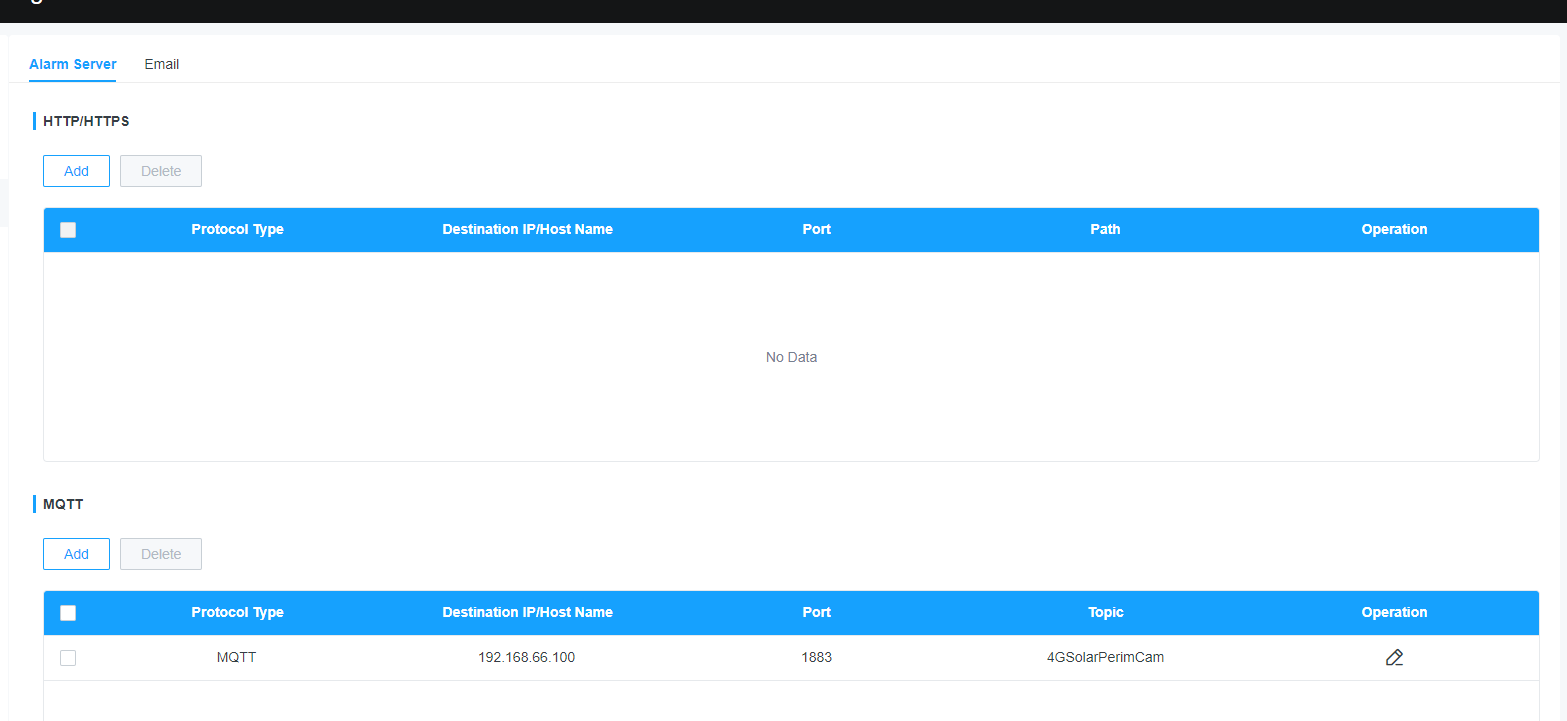
The available File Push Methods are: General and AWS S3. (AWS S3 is only supported via MQTT.)
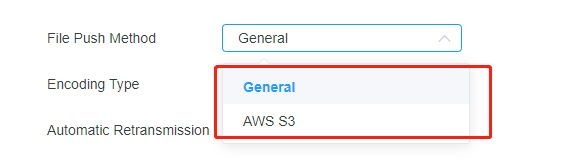
AWS S3 is an object storage service provided by Amazon Web Services. The Milesight SC411 specifically supports this type of file push method when used in conjunction with MQTT. The following outlines the entire data transfer workflow.
• Camera publish alarm data to the MQTT “Alarm Topic”.
Data sample:
{
"event_id": "1759024551056",
"event_type": "Motion Detection",
"device_name": "Perimeter Sensing Camera",
"mac_address": "1C:C3:16:54:3F:48",
"sn": "ipc",
"latitude": "24.624960",
"longitude": "118.030720",
"altitude": "103",
"time": "2025-09-28 09:55:51",
"time_msec": "2025-09-28 09:55:51.053",
"retransmit_time": "-",
"retransmit_count": 0,
"detection_region": 0,
"detection_region_name": "Entire Region",
"resolution_width": 2688,
"resolution_height": 1520,
"coordinate_x1": 944,
"coordinate_y1": 649,
"coordinate_x2": 1955,
"coordinate_y2": 1513,
"snapshot": [{"index": 0, "filename": "20250928095551_1759024551056_MotionDetection_0.jpg"}]
}
• The camera receives the "alarm Upload" message pushed by the MQTT server from the "Message Topic" in order to obtain the URL for uploading the alarm file.
Data sample:
{
"type": "alarmUpload",
"event_id": "1759024551056",
"event_type": "Motion Detection",
"mac_address": "1C:C3:16:54:3F:48",
"snapshot": [
{
"index": 0,
"method": "PUT",
"filename": "http://192.168.63.174:10922/main/snapshot.jpg"
}
],
"video_clip": {
"method": "PUT",
"index": 0,
"filename": "http://192.168.63.74:10922/main/video.mp4"
}
• If an image is included in the push, the camera publishes snapshot data to S3 and obtains the upload result.
• If a recording is included in the push, the camera publishes record data to S3 and obtains the upload result.
• Camera publish upload result to the “Result Topic”.
Data sample:
"type": "alarmUploadResult",
"event_id": "1759024551056",
"event_type": "Motion Detection",
"mac_address": "1C:C3:16:54:3F:48",
"snapshot": [
{
"index": 0,
"method": "PUT",
"filename": "http://192.168.63.174:10922/main/snapshot.jpg",
"result": "success"
}
],
"video_clip": {
"index": 0,
"method": "PUT",
"filename": "http://192.168.63.174:10922/main/snapshot.mp4",
"result": "success"
}
}
}
-END-