
Author | Version | Release Note | Date | Audit |
Dylan | V1.0 | How to use NVR API to control playback and download recordings | 2025.05.20 | Sky |
1.Introduction
This document mainly explains how to control playback and download recordings through the internal interfaces of the NVR. The first part covers the usage methods and parameter descriptions of the interfaces, while the second part focuses on the actual operation of the interfaces. After studying these two sections, you will be able to flexibly utilize these interfaces to fully control NVR playback.
2.Software
2.1Postman
2.1.1We recommend general users to download postman to adjust the interface parameters, which is more intuitive and easy to adjust.
https://www.postman.com/downloads/
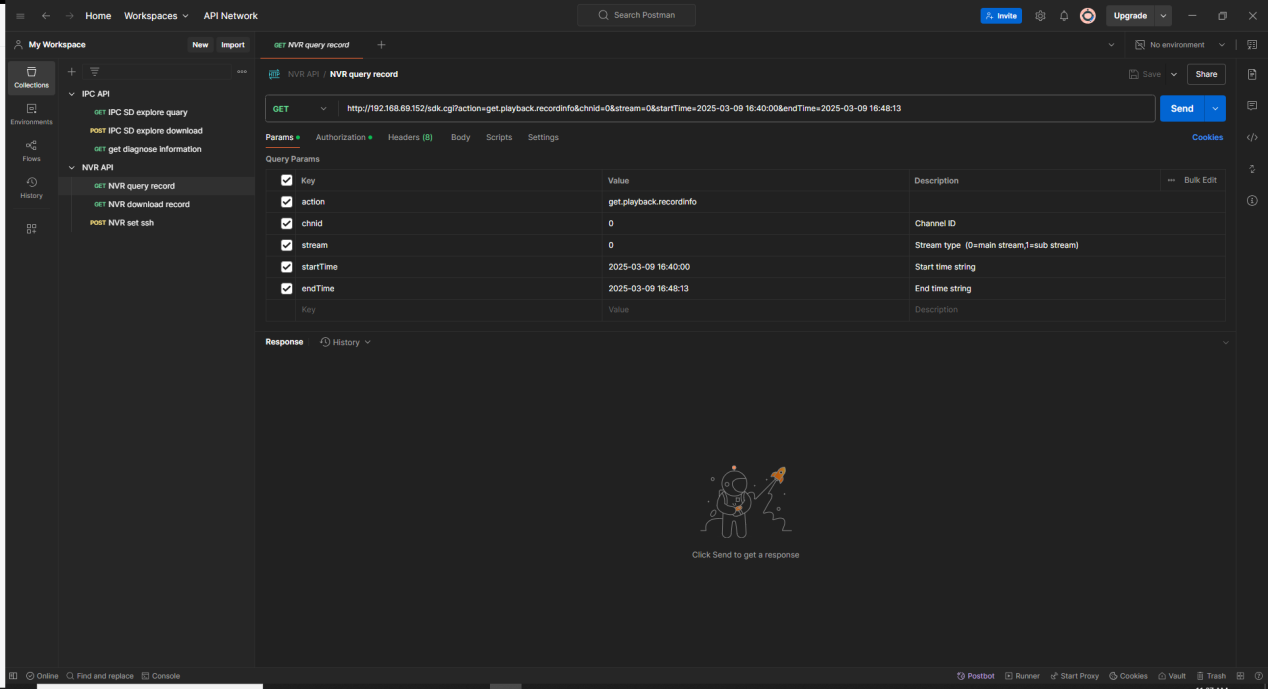
2.1.2After downloading and installing Postman, create a new http request and copy the interface address example into the URL box.
2.1.3 Select Basic Authorization under Authorization and enter the device account and password (for local testing only)
2.1.4 As shown in the figure, after copying the interface address into the URL box, it can automatically organize the parameters, values and descriptions (customizable) in the list below. We can directly modify the values in the parameter table, and the URL will be modified synchronously. It can also be saved for subsequent use.
2.2VLC
2.2.1 VLC is a free, open source, cross-platform multimedia player and framework that can play most multimedia files, as well as DVDs, audio CDs, VCDs, and various streaming protocols. Regarding playback and control, we use VLC in this article.
2.2.2 Project Address: https://www.videolan.org/vlc/
3Interfaces
3.1Control playback
3.1.1 get.playback.recordinfo
1 Interface Description
·Interface Name: get.playback.recordinfo
·Interface address:
http://192.168.69.152/sdk.cgi?action=get.playback.recordinfo&chnid=0&stream=0&startTime=2025-03-09 16:40:00&endTime=2025-03-09 16:48:13
·Request method: Get
2 Params
Key | Type | Example Value | Description |
action | String | get.playback.recordinfo | Fixed Value |
chnid | Int | 0 | Channel ID (start with 0) |
stream | Int | 0 | Stream Type (0=main ,1=sub) |
startTime | String | 2025-03-09 16:40:00 | The start time of the query, in the format of YYYY-MM-DD HH:MM:SS |
endTime | String | 2025-03-09 16:48:13 | The end time of the query, in the format of YYYY-MM-DD HH:MM:SS |
3 Response Example
[PLAYBACK]
cnt=1
sid=513549312
chnid=0
allCnt=1
allSize=522858496
ch0=0
startTime0=2025-03-09 16: 40: 00
endTime0=2025-03-09 16: 48: 13
recordType0=1
size0=522858496
recordtype0 = 1
4 Response Params
Key | Value | Description |
cnt | 1 | Count |
sid | 513549312 | Session ID |
chnid | 0 | Channel ID |
allSize | 522858496 | All Record Size |
startTime0 | 2025-03-09 16: 40: 00 | Record Start Time |
endTime0 | 2025-03-09 16: 48: 13 | Record End Time |
size0 | 522858496 | Record Size |
recordtype0 | 1 | 1 = timing 32=vca 230=event |
3.1.2 get.playback.rtspurl
1 Interface Description
·Interface Name: get.playback.rtspurl
·Interface address:
http://192.168.69.152/sdk.cgi?action=get.playback.rtspurl&sid=1
·Request method: Get
2 Params
Key | Type | Example Value | Description |
action | String | get.playback.rtspurl | Fixed Value |
sid | Int | 1 | Session ID: Fill in the sid obtained from the query response |
3 Response Example
[PLAYBACK]
sid=1
port=554
respath=pb_801
external_port=0
external_http_port=0
ddns_port=0
ddns_http_port=0
httppath=/ms/streaming/pb_801
3.1.3 play.playback.record
1 Interface Description
·Interface Name: play.playback.record
·Interface address:
http://192.168.69.235/sdk.cgi?action=play.playback.record&chnId=0&sid=1497310721&startTime=2025-03-20 16:40:00&endTime=2025-03-20 16:45:26&playTime=2025-03-20 16:40:00
·Request method: Get
2 Params
Key | Type | Example Value | Description |
action | String | play.playback.record | Fixed Value |
chnId | Int | 0 | Channel ID |
sid | Int | 1497310721 | Session ID: Fill in the sid obtained from the query response |
startTime | String | 2025-03-20 16:40:00 | |
endTime | String | 2025-03-20 16:45:26 | |
playTime | String | 2025-03-20 16:40:00 | The starting point of playback |
3 How to use
After calling the play.playback.record interface, we use the VLC player to play the activated RTSP URL. The URL format is as follows:
rtsp://username:password@nvr ip: rtsp port/respath
The respath has been obtained in 1.2.
Example:
rtsp://admin:ms123456@192.168.69.235:554/pb_801
3.1.4 get playback jump batch
1 Interface Description
·Interface Name: get playback jump batch
·Interface address:
http://192.168.69.235/sdk.cgi?action=set.playback.jump_batch&sid[0]=1948769025&cnt=1&jumpTime=2025-03-23 12:10:11
·Request method: Get
2 Params
Key | Type | Example Value | Description |
action | String | get playback jump batch | Fixed Value |
sid[0] | Int | 1948769025 | sid[subscript] = session ID When multiple sids need to be released, you can add s[1], s[2], etc. All interfaces containing "batch" have this feature, which will not be described in detail later. |
cnt | Int | 1 | Count |
jumpTime | String | 2025-03-23 12:10:11 | The time point you want to jump to. Note: the time point must be within the time range obtained from the recorded video query. |
3.1.5 set playback pause batch
1 Interface Description
·Interface Name: set playback pause batch
·Interface address:
http://192.168.69.235/sdk.cgi?action=set.playback.pause_batch&cnt=1&sid[0]=1
·Request method: Get
2 Params
Key | Type | Example Value | Description |
action | String | set playback pause batch | Fixed Value |
sid[0] | Int | 1 | Session ID |
cnt | Int | 1 | Count |
3.1.6 set playback resume
1 Interface Description
·Interface Name: set.playback.resume
·Interface address:
http://192.168.69.235/sdk.cgi?action=set.playback.resume&sid=1044564225
·Request method: Get
2 Params
Key | Type | Example Value | Description |
action | String | set.playback.resume | Fixed Value |
sid | Int | 1044564225 | Session ID |
3.1.7 set playback step batch
1 Interface Description
·Interface Name: set playback step batch
·Interface address:
http://192.168.69.235/sdk.cgi?action=set.playback.step_batch&direct=1&cnt=1&sid[0]=1275673089
·Request method: Get
2 Params
Key | Type | Example Value | Description |
action | String | set playback step batch | Fixed Value |
direct | Int | 1 | 0=Forward 1=Reverse |
cnt | Int | 1 | Count |
sid[0] | Int | 1275673089 | Session ID |
3.1.8 set playback speed batch
1 Interface Description
·Interface Name: set playback speed batch
·Interface address:
http://192.168.9.129/sdk.cgi?action=set.playback.speed&sid[0]=1&speed=1
·Request method: Get
2 Params
Key | Type | Example Value | Description |
action | String | set playback step batch | Fixed Value |
cnt | Int | 1 | Count |
sid[0] | Int | 1275673089 | Session ID |
speed | Int | 1 | -2=1/4x ;-1 = 1/2x; 0=1x; 1=2x; 2=4x; |
3.1.9 set playback stop batch
1 Interface Description
·Interface Name: set playback step batch
·Interface address:
http://192.168.69.235/sdk.cgi?action=set.playback.stop_batch&cnt=1&sid[0]=2030619648
·Request method: Get
2 Params
Key | Type | Example Value | Description |
action | String | set playback stop batch | Fixed Value |
sid[0] | Int | 2030619648 | Session ID |
cnt | Int | 1 | Count |
3.2Download Record
3.2.1 get.playback.recordinfo
1 Interface Description
·Interface Name: get.playback.recordinfo
·Interface address:
http://192.168.69.152/sdk.cgi?action=get.playback.recordinfo&chnid=0&stream=0&startTime=2025-03-09 16:40:00&endTime=2025-03-09 16:48:13
·Request method: Get
2 Params
Key | Type | Example Value | Description |
action | String | get.playback.recordinfo | Fixed Value |
chnid | Int | 0 | Channel ID (start with 0) |
stream | Int | 0 | Stream Type (0=main ,1=sub) |
startTime | String | 2025-03-09 16:40:00 | The start time of the query, in the format of YYYY-MM-DD HH:MM:SS |
endTime | String | 2025-03-09 16:48:13 | The end time of the query, in the format of YYYY-MM-DD HH:MM:SS |
3 Response Example
[PLAYBACK]
cnt=1
sid=513549312
chnid=0
allCnt=1
allSize=522858496
ch0=0
startTime0=2025-03-09 16: 40: 00
endTime0=2025-03-09 16: 48: 13
recordType0=1
size0=522858496
4 Response Params
Key | Value | Description |
cnt | 1 | Count |
sid | 513549312 | Session ID |
chnid | 0 | Channel ID |
allSize | 522858496 | All Record Size |
startTime0 | 2025-03-09 16: 40: 00 | Record Start Time |
endTime0 | 2025-03-09 16: 48: 13 | Record End Time |
size0 | 522858496 | Record Size |
3.2.2 get.playback.download
1 Interface Description
·Interface Name: get.playback.download
·Interface address:
http://192.168.69.152/sdk.cgi?action=get.playback.download&chnid=0&streamType=primary&videoFormat=mp4&streamData=1&startTime=2025-03-09 16:40:00&endTime=2025-03-09 16:48:13&sid=1
·Interface address:
·Request method: Get
2 Params
Key | Type | Example Value | Description |
action | String | get.playback.download | Fixed Value |
chnid | Int | 0 | Channel ID |
streamType | String | primary | Stream Type |
startTime | String | 2025-03-09 16:40:00 | Fill in the time period obtained from the query response |
endTime | String | 2025-03-09 16:48:13 | Fill in the time period obtained from the query response |
sid | Int | 513549312 | Session ID: Fill in the sid obtained from the query response |
streamData | Int | 1 | Metadata,fixed value |
3.3Session Release
After each playback or download of a video, it is recommended to clear the session ID in time to prevent queue accumulation and device lag. The NVR limits the maximum number of session IDs to 60.
3.3.1 set.playback.close_batch
1 Interface Description
·Interface Name: set.playback.close_batch
·Interface address:
http://192.168.69.152/sdk.cgi?action=set.playback.close_batch&sid[0]=1&cnt=1
·Request method: Get
2 Params
Key | Type | Example Value | Description |
action | String | set.playback.close_batch | Fixed Value |
sid[0] | Int | 513549312 | Session ID |
cnt | Int | 1 | Total number of record clips |
----- END ----