
Version | V2.0 | Update | 2025.2.19 |
1. Introduction
The performance of NVR is reflected in the following 3 main aspects.
• Access and Forwarding
Access | How many cameras NVR can connect to. |
Forwarding | How many cameras NVR can forward to remote site. |
• Synchronous Decoding
Decoding Capacity | How many cameras it can play at the same time under Live View or Playback page. |
Decoding Mechanism | NVR rules for playing primary or secondary stream. |
• Recording Limitation
Recording Resolution | The maximum decoding resolution of a single channel. |
Synchronous Recording | Maximum number of channels for simultaneous recording. |
This article will explain and give some examples of performance issues for each section.
2. Access and Forwarding
Generally, the Bit Rate of IP Camera is different under different Primary Stream Resolutions. You can refer to the following table about the Milesight IP camera default Bit Rate of each Primary Stream Resolution:
Primary Stream Resolution | Default Bit Rate (kbps) | ||
H.264 | H.265 | MJPEG | |
12M(4000*3000) | 10240 | / | / |
8M(3840*2160) | 10240 | 8192 | / |
6M(3072*2048)/ 6M(3200*1800) | 8192 | 6144 | / |
5M(2560*1920)/ 5M(2592*1944) | 8192 | 6144 | / |
4M(2592*1520)/ 4M(2688*1520)/ 4M(2560*1440) | 6144 | 4096 | / |
3M(2304*1296) | 6144 | 4096 | / |
3M(2048*1536) | 6144 | 2048 | / |
1080P(1920*1080) | 4096 | 4096 | 4096 |
1.3M(1280*960) | 4096 | 2048 | 4096 |
720P(1280*720) | 2048 | 1024 | 4096 |
D1(704*576) | 2048 | 1024 | / |
Table 2.1 Milesight IP Camera Default Bit Rate of each Primary Stream Resolution
Note: The default bit rate of special models like AI Dual-sensor 180° Panoramic Network Camera,180° Panoramic Mini Dome Camera and 180° Panoramic Mini Bullet Camera is not elaborated in this document. If you have any questions, please contact Milesight technical support team.
In addition, the Milesight IP Camera default Resolution of Secondary Stream is D1, the default Bit Rate is 512kbps. Totally, the Bit Rate of a single camera is Primary Stream Bit Rate + Secondary Stream Bit Rate. For example, the Bit Rate of 2MP Milesight IP camera is 4.5Mbps (H.264 or H.265).
2.1 Access
Incoming Bandwidth determines the number and resolution of cameras connected to the NVR.
For example, the Incoming Bandwidth of 1009-UPT is 90Mbps, and a 2MP camera’s default bandwidth under H.264 mode is 4.5Mbps. If you want to add 2MP camera *9 to NVR, it would be 4.5*9=40.5Mbps<90Mbps, which means that adding 2MP camera *9 is available. Milesight NVR has Free Receiving Bandwidth to remind the current NVR remaining bandwidth on Camera Management page.
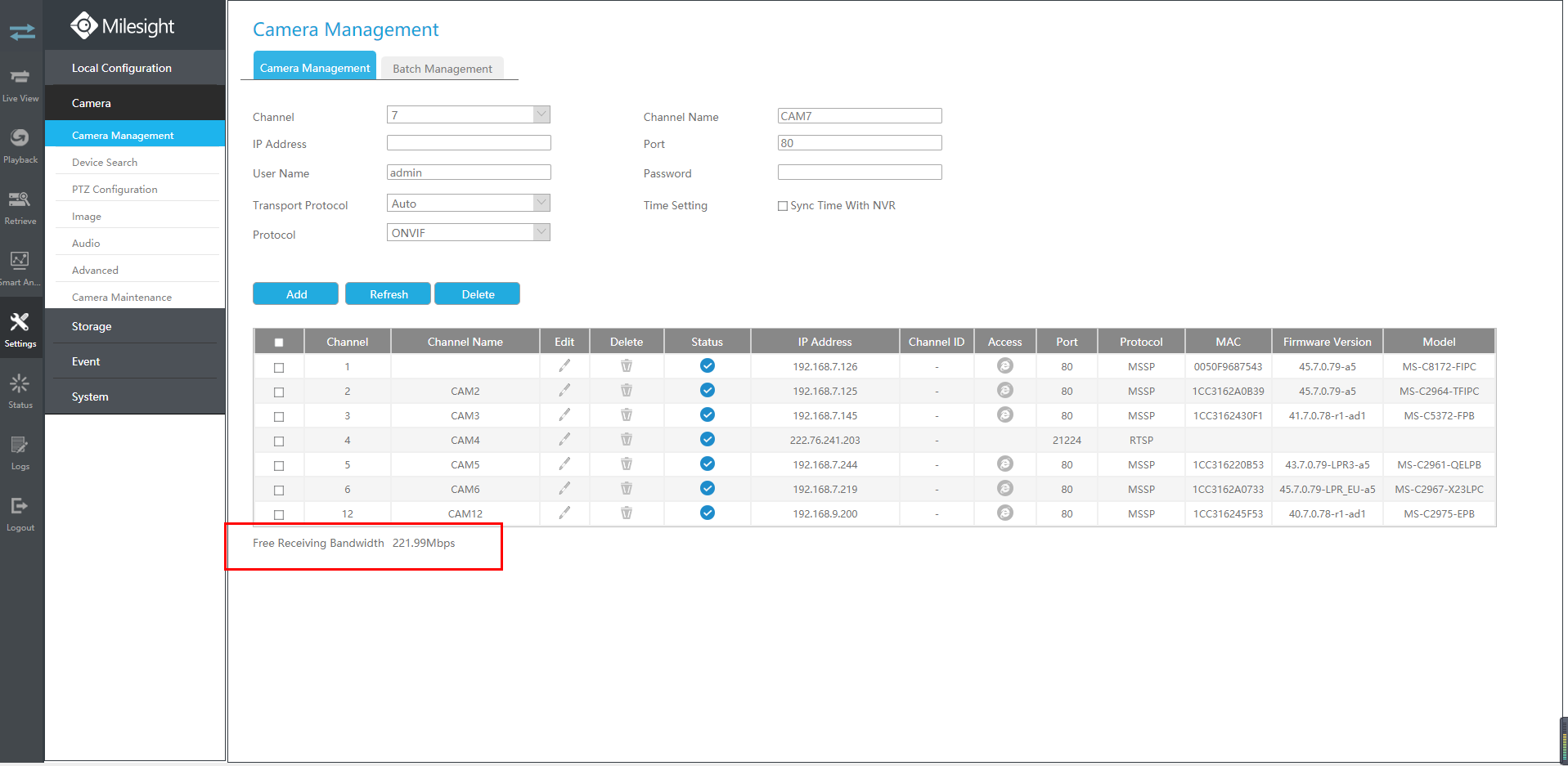
For more details of Incoming Bandwidth , please refer to the following table:
NVR Model | Incoming Bandwidth |
MS-N1004-UPC | 80Mbps |
MS-N1004-UC | |
MS-N1008-UC | |
MS-N1008-UPC | |
MS-N1008-UNC | |
MS-N1008-UNPC | |
MS-N1009-UPT | 90Mbps |
MS-N1009-UT | |
MS-N1009-UNT | |
MS-N5008-UPT | 80Mbps |
MS-N5008-UT | |
MS-N5008-UC | |
MS-N5008-UPC | |
MS-N5008-E | |
MS-N5008-PE | |
MS-N5008-NE | |
MS-N5008-NPE | |
MS-N5016-UT | 160Mbps |
MS-N5016-UPT | |
MS-N5016-E | |
MS-N5016-PE | |
MS-N5016-NE | |
MS-N5016-NPE | |
MS-N7016-UH | |
MS-N7016-UPH | |
MS-N7016-G | |
MS-N7016-PG | |
MS-N7032-UH | 256Mbps RAID on: 200Mbps |
MS-N7032-UPH | |
MS-N7032-G | |
MS-N7048-UPH | |
MS-N7048-PG | |
MS-N8032-UH | |
MS-N8032-G | |
MS-N8064-UH | |
MS-N8064-G |
For the details, please refer to the following table:Table 2.2 Incoming Bandwidth
Note:
RAID on will occupy part of the resources, resulting in a lower upper limit of the available bandwidth. The following Outgoing Bandwidth will also be affected.
2.2 Forwarding
Forwarding capacity is limited by 3 factors: 1. Max. Forwarding Single Stream; 2. NVR Outgoing Bandwidth; 3. Max. Forwarding Connection;
• Max. Forwarding Single Stream: The Max. Forwarding Single Stream of All series NVR is 16. For example, if an IP Camera enables the primary and secondary streams, the maximum number of forwarding primary stream is 16 and the maximum number of secondary streams is 16.
• NVR Outgoing Bandwidth: Different series NVR has different Bandwidth limitations. For example, 1004-UPC Outgoing bandwidth is 80Mbps, and added 2MP camera *4. In this case, secondary stream will cost 4*0.5Mpbs=2Mpbs, you can add the camera to max. 16(Max. Forwarding Single Stream) remote sides with secondary stream, such as CMS, App, etc. It will cost 2*16=32Mbps<80Mbps.
• Max. Forwarding Connection: The Max. Forwarding Connection of All Series NVR is 1024. For example, the NVR connects to 60 camera channels, then adds the NVR to 20 CMS sides and plays them, so that there are a total of 1200 forwarding channels. Channels that exceed the limit will failed to display on the CMS.
NVR Model | Max. Forwarding Single Stream | Outgoing Bandwidth | Max. Forwarding Connection |
MS-N1004-UPC | 16 | 80Mbps | 1024 |
MS-N1004-UC | |||
MS-N1008-UC | |||
MS-N1008-UPC | |||
MS-N1008-UNC | |||
MS-N1008-UNPC | |||
MS-N1009-UPT | 90Mbps | ||
MS-N1009-UT | |||
MS-N1009-UNT | |||
MS-N5008-UPT | 80Mbps | ||
MS-N5008-UT | |||
MS-N5008-UC | |||
MS-N5008-UPC | |||
MS-N5008-E | |||
MS-N5008-PE | |||
MS-N5008-NE | |||
MS-N5008-NPE | |||
MS-N5016-UT | 160Mbps | ||
MS-N5016-UPT | |||
MS-N5016-E | |||
MS-N5016-PE | |||
MS-N5016-NE | |||
MS-N5016-NPE | |||
MS-N7016-UH | |||
MS-N7016-UPH | |||
MS-N7016-G | |||
MS-N7016-PG | |||
MS-N7032-UH | 256Mbps RAID on: 200Mbps | ||
MS-N7032-UPH | |||
MS-N7032-G | |||
MS-N7048-UPH | |||
MS-N7048-PG | |||
MS-N8032-UH | |||
MS-N8032-G | |||
MS-N8064-UH | |||
MS-N8064-G |
Table 2.3 Forwarding Conditions
In summary, forwarding is determined by the above 3 conditions, for example,
Q: 5016-UT Outgoing bandwidth is 160Mbps, and then add 2MP camera *16. How many users can connect to and play them by CMS locally or remotely at the same time?
A: Before starting, we should know Milesight CMS default to display the Secondary stream in the case of forwarding multiple channels.
The calculation process is as follows:
Step1: Max. Forwarding Single Stream 16 ch secondary stream will cost 8Mbps(0.5Mpbs *16=8Mbps) Outgoing bandwidth and it can be forwarded 16 times. Totally, it will cost 8*16=128Mbps.
Step2: Outgoing Bandwidth The remaining free outgoing bandwidth is 32Mbps (160-128=32Mbps). As we know, 2MP primary stream will cost 4Mbps, so only 8ch(32/4=8ch) can be forwarded now which is less than 1 site(8ch<16ch).
Step3: Max. Forwarding Connection each site 16ch, totally, it will cost 16*16=256ch which is less than 1024ch. So it’s available.
To sum up, the number of forwarding channels Connected and Played at the same time is 16 sites, each site: 16ch secondary stream live viewing at the same time. (Site contains CMS, M-sight pro, VMS Enterprise, etc). 16 is only a theoretical value, max 10 sites would be fair. Because sometimes it needs to be Playback at the same time.
Note:
Adding NVR to CMS will not affect forwarding capability, only play them will count forwarding number.
For example, you can even add NVR to 100 remote sites, as long as you don’t play it.
3. Synchronous Decoding
3.1 Decoding Capacity
NVR needs to decode stream in order to play the stream normally. Decoding Capacity is only related to Resolution and is applied to Live View and Playback interface. When you want to watch Live View or Playback, NVR must be compliant with the decoding limitation. For the details about Decoding Capacity, please refer to below:
NVR Model | 30fps@8MP | 30fps@6MP | 30fps@5MP | 30fps@4MP | 30fps@3MP | 30fps @1080P | 30fps@720P | 30fps@D1 |
MS-N1004-UPC | 1-CH | 1-CH | 1-CH | 2-CH | 2-CH | 4-CH | 4-CH | 4-CH |
MS-N1004-UC | ||||||||
MS-N1008-UC | 8-CH | 8-CH | ||||||
MS-N1008-UPC | ||||||||
MS-N1008-UNC | ||||||||
MS-N1008-UNPC | ||||||||
MS-N5008-UC | ||||||||
MS-N5008-UPC | ||||||||
MS-N1009-UPT | 2-CH | 2-CH | 3-CH | 4-CH | 5-CH | 8-CH | 9-CH | 9-CH |
MS-N1009-UT | ||||||||
MS-N1009-UNT | ||||||||
MS-N5008-UPT | 8-CH | 8-CH | ||||||
MS-N5008-UT | ||||||||
MS-N5016-UT | 16-CH | 16-CH | ||||||
MS-N5016-UPT | ||||||||
MS-N7016-UH | 4-CH | 5-CH | 6-CH | 8-CH | 10-CH | 16-CH | 16-CH | 16-CH |
MS-N7016-UPH | ||||||||
MS-N7032-UH | 32-CH | 32-CH | ||||||
MS-N7032-UPH | ||||||||
MS-N7048-UPH | ||||||||
MS-N8032-UH | ||||||||
MS-N8064-UH | 64-CH | |||||||
MS-N5008-E | 1-CH | 2-CH | 2-CH | 3-CH | 4-CH | 6-CH | 12-CH | 12-CH |
MS-N5008-PE | ||||||||
MS-N5016-E | ||||||||
MS-N5016-PE | ||||||||
MS-N5008-NE | 3-CH | 4-CH | 4-CH | 6-CH | 8-CH | 12-CH | 24-CH | 24-CH |
MS-N5008-NPE | ||||||||
MS-N5016-NE | ||||||||
MS-N5016-NPE | ||||||||
MS-N7016-G | 4-CH | 6-CH | 7-CH | 9-CH | 12-CH | 18-CH | 36-CH | 36-CH |
MS-N7016-PG | ||||||||
MS-N7032-G | 6-CH | 8-CH | 9-CH | 12-CH | 16-CH | 24-CH | 48-CH | 48-CH |
MS-N7048-PG | ||||||||
MS-N8064-G | ||||||||
MS-N8032-G |
Table 3.1 Decoding Capacity
3.2 Decoding Mechanism
Milesight NVR automatically distributes the stream to play according to the Decoding Mechanism which follows the below principles:
• Display the maximum number of channels
• If the number of pixels in the window > the resolution of the secondary stream, the channel plays the primary stream. If not, the channel plays the secondary stream.
By default, the decoding mechanism will automatically allocate the primary and secondary streams according to the above principles.
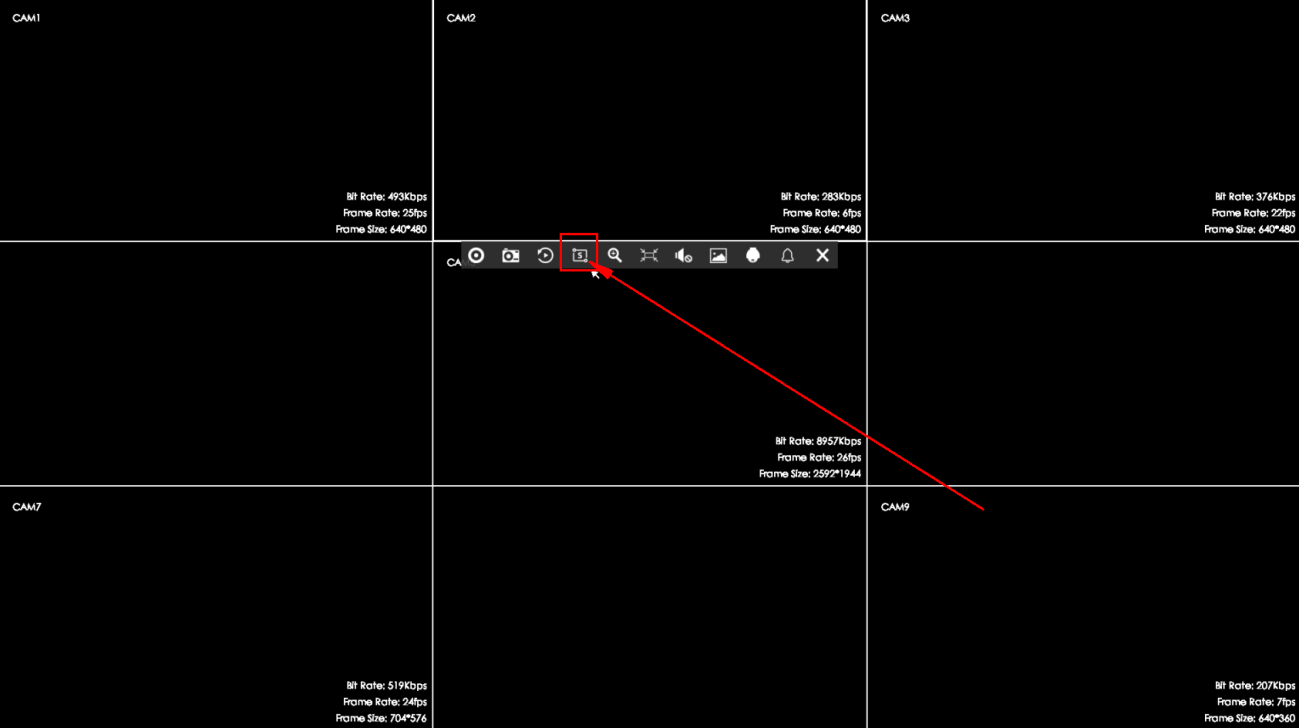
In addition, we can also manually switch the primary and secondary streams. (Upgrade NVR firmware version to 7X.9.0.13 (2021/9) or above.)
Note:
By default, the NVR allocates the stream according to the current connection of IP Camera. If there is a “No Resource” problem, you can manually refresh the channel to redistribute the stream. Such as Manually switch the channel layout, Double-click to enlarge a channel and then return to normal size or Switch to another function interface and return to live view page,etc.
Q: 1009-UPT with 9 Screen Channel layouts. Why the channel of Local Monitor will prompt “No Resource”. How to solve it?
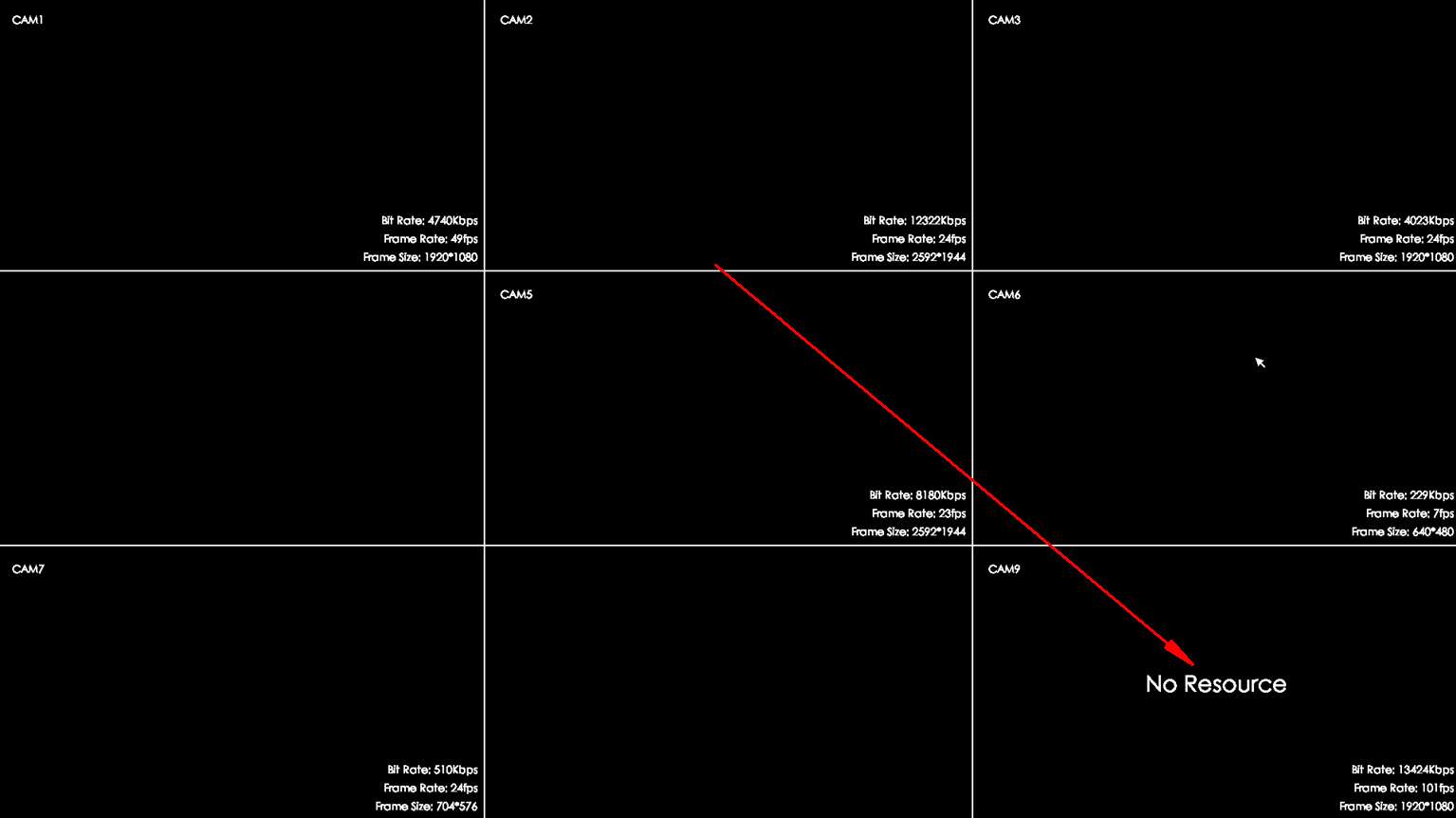
A: Firstly, make sure the Secondary stream of cameras is enabled.
Secondly, switch to other layouts such as Single Screen, and then switch back to 4 Screen, you will see that both IP Cameras are playing normally, because some IP Cameras have been switched to the secondary stream.
If you upgrade to 7X.9.0.13 version or above, you can switch the stream on Live View.
4. Recording Limitation
4.1 Recording Resolution
In fact, as long as the Incoming Bandwidth allows, there is no limit to the Recording Resolution, but considering the limitation of Decoding Capacity, the Playback interface cannot play too high resolution video. So generally, we recommend the Recording Resolution of each NVR model like below shown:
NVR Model | Synchronous Recording |
MS-N1004-UPC | 8MP/6MP/5MP/4MP/3MP/1080P/ UXGA/720P/D1/VGA/CIF/QCIF |
MS-N1004-UC | |
MS-N1008-UC | |
MS-N1008-UPC | |
MS-N1008-UNC | |
MS-N1008-UNPC | |
MS-N1009-UPT | |
MS-N1009-UT | |
MS-N1009-UNT | |
MS-N5008-UPT | |
MS-N5008-UT | |
MS-N5008-UC | |
MS-N5008-UPC | |
MS-N5016-UT | |
MS-N5016-UPT | |
MS-N5008-E | 12MP/8MP/6MP/5MP/4MP/3MP/1080P/ UXGA/720P/D1/VGA/CIF/QCIF |
MS-N5008-PE | |
MS-N5008-NE | |
MS-N5008-NPE | |
MS-N5016-E | |
MS-N5016-PE | |
MS-N5016-NE | |
MS-N5016-NPE | |
MS-N7016-UH | |
MS-N7016-UPH | |
MS-N7016-G | |
MS-N7016-PG | |
MS-N7032-UH | |
MS-N7032-UPH | |
MS-N7032-G | |
MS-N7048-UPH | |
MS-N7048-PG | |
MS-N8032-UH | |
MS-N8032-G | |
MS-N8064-UH | |
MS-N8064-G |
Table 4.1 Recording Resolution
From the Table 4.1, we can know only 7/8000 Series NVR support recording 12MP Milesight Fisheye camera.
4.2 Synchronous Recording
For Synchronous Recording, the Incoming Bandwidth is mainly limitation. Here we can only give a recommended range. For details, please refer to the following table:
NVR Model | Synchronous Recording |
MS-N1004-UPC | 4*5MP |
MS-N1004-UC | |
MS-N1008-UC | 8*5MP |
MS-N1008-UPC | |
MS-N1008-UNC | |
MS-N1008-UNPC | |
MS-N1009-UPT | 9*5MP |
MS-N1009-UT | |
MS-N1009-UNT | |
MS-N5008-UPT | 8*5MP |
MS-N5008-UT | |
MS-N5008-UC | |
MS-N5008-UPC | |
MS-N5008-E | |
MS-N5008-PE | |
MS-N5008-NE | |
MS-N5008-NPE | |
MS-N5016-UT | 16*5MP |
MS-N5016-UPT | |
MS-N5016-E | |
MS-N5016-PE | |
MS-N5016-NE | |
MS-N5016-NPE | |
MS-N7016-UH | |
MS-N7016-UPH | |
MS-N7016-G | |
MS-N7016-PG | |
MS-N7032-UH | 32*5MP |
MS-N7032-UPH | |
MS-N7032-G | |
MS-N7048-UPH | |
MS-N7048-PG | |
MS-N8032-UH | |
MS-N8032-G | |
MS-N8064-UH | |
MS-N8064-G |
Table 4.2 Synchronous Recording
-END-