
Description
This document will introduce how to integrate between Milesight LPR camera and NVR or VMS (Including Milesight brand and the third parties brand). There are three post types: TCP, HTTP and RTSP.
Note:
- 1. For the Evidence function, please make sure your camera’s model is TSxxxx-xxC or MS-Cxxxx-xLC and your camera’s version is 45.8.0.3-LPR_XX-r1 or above. If your camera’s model is MS-Cxxxx-xLxE or TSxxxx-xxxE, please make sure your camera’s version is T_61.8.0.3_XX-r7 or above.
- 2. For the Parking Detection, please make sure your camera’s model is TSxxxx-FPC/P and your camera’s version is 45.8.0.3-LPR_XX-r3 or above. If your camera’s model is TSxxxx-FPE/P, please make sure your camera’s version is T_61.8.0.3_XX-r7 or above.
- 3. For the Vehicle Counting, please make sure your camera’s model is TSxxxx-xxC (Except for TSxxxx-FPC/P) and your camera’s version is 45.8.0.3-LPR_XX-r3 or above. If your camera’s model is TSxxxx-xxE (Except for TSxxxx-FPE/P), please make sure your camera’s version is T_61.8.0.3_XX-r7 or above.
- 4. For the List Event with HTTP post method, please make sure your camera’s model is MS-Cxxxx-xLxC or TSxxxx-xxxC and your camera’s version is 45.8.0.3-LPR_XX-r8 or above. If your camera’s model is MS-Cxxxx-xLxE or TSxxxx-xxxE, please make sure your camera’s version is T_61.8.0.3_XX-r7 or above.
- 5. For the Attributes Event, please make sure your camera’s model name is TSxxxx-xxxC (Except for TSxxxx-FPC/P) and your camera’s version is T_61.8.0.3_XX-r1 or above.
- 6. For the Violation Management, please make sure your camera’s model is MS-Cxxxx-xLxC or TSxxxx-xxxC and your camera’s version is 45.8.0.3-LPR_XX-r6 or above. If your camera’s model is MS-Cxxxx-xLxE or TSxxxx-xxxE, please make sure your camera’s version is T_61.8.0.3_XX-r7 or above.
- 7. Due to some code conflicts between different platforms, if your camera model is MS-Cxxxx-xxxE or TSxxxx-xxxE, it is recommended to upgrade your camera to T_61.8.0.3_XX-r13 or above before integration with your system. If your camera model is MS-Cxxxx-xxxC or TSxxxx-xxxC, it is recommended to upgrade your camera to T_45.8.0.3_XX-r9 or above before integration with your system.
1. TCP Type
- l System Structure
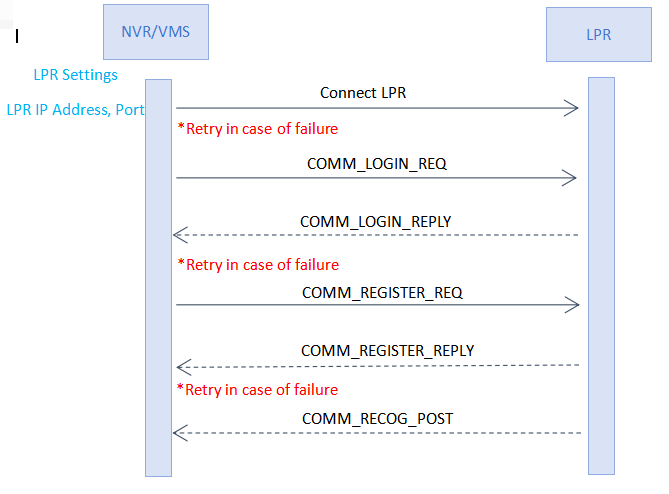
Enter the LPR IP address and LPR port on the NVR/VMS to register the LPR camera. Then LPR Camera will transmit the data of recognition result to the NVR/VMS when the license plate is recognized. The data includes the time that was recognized, the license plate, the license plate snapshot, and the full-screen snapshot.
- l List of messages
| Command Name | Explanation |
0x0001 | COMM_LOGIN_REQ | Request login to LPR camera. |
0x8001 | COMM_LOGIN_REPLY | Response to COMM_LOGIN_REQ. |
|
|
|
0x0002 | COMM_REGISTE_REQ | Request to register features that needs to be pushed. |
0x8002 | COMM_REGISTE_REPLY | Response to registration status. |
|
|
|
0x8801 | COMM_RECOG_POST | The metadata and image of recognition result. |
0x8802 | COMM_PARKING_POST | Parking Detection data (registration required). |
0x8803 | COMM_COUNTING_POST | Vehicle Counting data (registration required). |
0x8804 | COMM_LIST_EVENT_POST | List Event (registration required). |
0x8805 | COMM_ATTRIBUTES_POST | Attribute (registration required). |
0x8806 | COMM_VIOLATION_POST | Violation (registration required). |
- l Basic Packet Composition
- 1. SIG CC FF : Packet Start
- 2. SIG END FF DD : Packet End
- 3. COMMAND
- 4. DATA_SIZE
- 5. DATA
Basic Packet Composition
SIG | COMMAND | DATA_SIZE | DATA | SIG END |
2 byte | 2 byte | 4 byte | Variable | 2 byte |
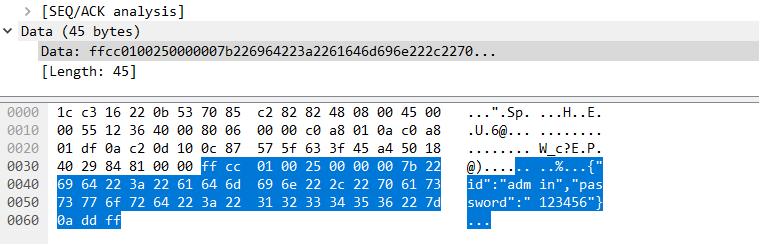
- l COMM_LOGIN_REQ
- 1. Data Type: JSON-charset=utf-8
- 2. Data Content: ID and Password
- 3. Example
{
“id”: “admin”,
“password”: “1234”
}
SIG | COMMAND | DATA_SIZE | DATA | SIG END |
2 byte | 2 byte | 4 byte | Variable | 2 byte |
CC FF | 0x0001 | Variable | JSON DATA | FF DD |
※ DATA_SIZE = DATA length + 2 bytes(SIG END)
※ Use Little-Endian
- l COMM_LOGIN_REPLY
- 1. Data Type : JSON-charset=utf-8
- 2. Data Content : result - Required Items
HTTP Status code
- a. 200 : OK
- b. 401 : No Privileges
- c. Etc...
- 3. Example
{
“result”: “200”
}
SIG | COMMAND | DATA_SIZE | DATA | SIG END |
2 byte | 2 byte | 4 byte | Variable | 2 byte |
CC FF | 0x8001 | Variable | JSON DATA | FF DD |
- l COMM_REGISTER_REQ
- 1. Data Type : JSON-charset=utf-8
- 2. Data Content: register-Required Items
- a. registerAll
- b. Lprparking
- c. Vehiclecount
- d. Attributes Event
- e. List Event
- f. Violation Event
- g. General
- 3. Example
①When you want to register all features (It currently includes Parking Detection and Vehicle Counting), you can set “registerAll” to 1. (Please note that if your camera’s model or firmware version does not support this feature, even if set the “registerAll” to 1, it will not work.) Refer to the following case:
{
“registerAll”: 1,
}
②When you want to register only one feature, you can set that feature to 1 and set the “registerAll” to 0, refer to the following case:
{
“registerAll”: 0,
“vehiclecount”: 1
}
Or
{
“registerAll”: 0,
“lprparking”: 1
}
SIG | COMMAND | DATA_SIZE | DATA | SIG END |
2 byte | 2 byte | 4 byte | Variable | 2 byte |
CC FF | 0x0002 | Variable | JSON DATA | FF DD |
- l COMM_REGISTER_REPLY
- 1. Data Type : JSON-charset=utf-8
- 2. Data Content : result - Required Items
HTTP Status code
- h. 200 : OK
- i. 401 : No Privileges
- j. Etc...
- 3. Example
{
“result”: “200”
“registerAll”: 1,
}
SIG | COMMAND | DATA_SIZE | DATA | SIG END |
2 byte | 2 byte | 4 byte | Variable | 2 byte |
CC FF | 0x8002 | Variable | JSON DATA | FF DD |
- l COMM_RECOG_POST
- 1. Recognition Result Message
- v The LPR camera sends the recognition results on its own initiative without requiring a request from the NVR/VMS.
- v Data Type : Binary
- v Data Content
- a. metadata
- ① Device ID : 16 byte – GUID byte array : 04 f9 12 bb ce 94 65 40 89 af e8 3c d8 8f 70 be
- ② recognition time : 8 byte – Posix Time : 1525867890000
- ③
Car Number: 16byte – utf-8 string : “부산02가1234”<< NULL Exclude Fixed Size - ④ Color of the Car : 1 byte – refer to the color table(stand by)
- ⑤ Color of the licence plate : 1 byte – refer to the color table(stand by)
- ⑥ Speed : 2 byte – unsigned short integer, Km/h Unit (mph unit need to convert yourselves)
- ⑦ Number of resulting images : 1 byte
- ⑧ Direction : 1 byte – 0: Unknown 1: In 2: Out
- ⑨ Region: 32 byte
- ⑩ ROI ID : 1 byte 1~4 0:unknown
- ⑪ plate’s length
- ⑫ license plate
- ⑬ Vehicle Type: 1 byte – refer to the brand table(stand by)
- ⑭ Confidence: 4 byte(float)
- ⑮ Plate Type: 1: black 2: white 3: visitor
- ⑯ Distance: (int)need to enable radar
- ⑰ Azimuth: (float) need to enable radar
- ⑱ Vehicle Count: need to enable radar
- ⑲ Width: resolution width
- ⑳ Height: resolution height
- 21 coordinate_x1: The left coordinates of license plate.
- 22 coordinate_y1: The top coordinates of license plate.
- 23 coordinate_x2: The right coordinates of license plate.
- 24 coordinate_y2: The bottom coordinates of license plate.
- 25 Vehicle Brand: 2 byte – refer to the brand table(stand by)
- b. Image data : variable size
- c. Data Chunk
- ① Chunk ID : 4 byte
Meta : 11 ff 00 00
Image : 22 ff 00
- ② Chunk Size : 4 byte
Data size excluding Chunk Header 8 byte.
- 2. Packet Example
SIG | COMMAND | DATA_SIZE | DATA | SIG END |
2 byte | 2 byte | 4 byte | Variable | 2 byte |
CC FF | 0x8801 | Variable | ... | FF DD |
Metadata Chunk | Image Chunk | Image Chunk |
Chunk Header | Metadata Chunk | ||||||||
Chunk ID | Chunk Size 4 byte | GUID 16 byte | Time 8 byte |
16 byte | V-color 1 byte | P-color 1 byte | Speed 2 byte |
1 byte | Direction 1byte |
11 FF 00 00 | 112+Number length (GUID+...+Number ) | 04 f9 12 ... | 0x16344D04550 |
| 0x01 | 0x01 | 100 | 2 | 0 |
|
| Region 32byte | ROI ID 1byte | Plate Len 1byte | Number Variable | Vehicle Type 1 byte | Confidence 4 byte | Plate type 1 byte | Distance 4 byte |
|
| WOB/ZK | 1 | 6 | “AB1234” | 1 |
| 3 | 30 |
|
| Azimuth 4 byte | Vehicle Count 4 byte | Width 2 byte | Height 2 byte | coordinate_x1 2 byte | coordinate_y1 2 byte | coordinate_x2 2 byte | coordinate_y2 2 byte |
|
| 3.5 | 50 | 1280 | 720 |
|
|
|
|
|
| Brand 2 byte |
|
|
|
|
|
|
|
|
| BMW |
|
|
|
|
|
|
|
Plate_image:
Chunk Header | Image Chunk | |
Chunk ID 4 byte | Chunk Size 4 byte | JPEG image data |
22 FF 00 00 | Variable | FF D8 FF E0 ... |
Full_image:
Chunk Header | Image Chunk | |
Chunk ID 4 byte | Chunk Size 4 byte | JPEG image data |
22 FF 00 00 | Variable | FF D8 FF E0 ... |
Note: If the Evidence function is set, the following is the case with LPR images:
①No Plates: Full Image + Evidence Image(If you have it.)
②With Plates: Plate image + Full Image + Evidence Image(If you have it.)
Evidence_image0:
Chunk Header | Image Chunk | |
Chunk ID 4 byte | Chunk Size 4 byte | JPEG image data |
22 FF 00 00 | Variable | FF D8 FF E0 ... |
Evidence_image1:
Chunk Header | Image Chunk | |
Chunk ID 4 byte | Chunk Size 4 byte | JPEG image data |
22 FF 00 00 | Variable | FF D8 FF E0 ... |
- l Color Table
Parameter | Note |
enum LprColor{ LPR_COLOR_UNKNOWN = 0, LPR_COLOR_BLACK, LPR_COLOR_BLUE, LPR_COLOR_CYAN, LPR_COLOR_GRAY, LPR_COLOR_GREEN, LPR_COLOR_RED, LPR_COLOR_WHITE, LPR_COLOR_YELLOW, LPR_COLOR_VIOLET, LPR_COLOR_ORANGE }; |
"Black" "Blue" "Cyan" "Gray" "Green" "Red" "White" "Yellow" "Violet" "Orange"
|
- l Brand Table
Parameter | Note |
typedef enum traBrandType{ TRA_BRAND_UNKNOW = 0, TRA_BRAND_AUDI, TRA_BRAND_ASTONMARTIN, TRA_BRAND_ALFAROMEO, TRA_BRAND_BUICK, TRA_BRAND_MERCEDESBENZ, TRA_BRAND_BMW, TRA_BRAND_HONDA, TRA_BRAND_PEUGEOT, TRA_BRAND_PORSCHE, TRA_BRAND_BENTLEY, TRA_BRAND_BUGATTI, TRA_BRAND_VOLKSWAGEN, TRA_BRAND_DODGE, TRA_BRAND_DAEWOO, TRA_BRAND_DAIHATSU, TRA_BRAND_TOYOTA, TRA_BRAND_FORD, TRA_BRAND_FERRARI, TRA_BRAND_FIAT, TRA_BRAND_GMC, TRA_BRAND_MITSUOKA, TRA_BRAND_HAVAL, TRA_BRAND_GEELY, TRA_BRAND_JEEP, TRA_BRAND_JAGUAR, TRA_BRAND_CADILLAC, TRA_BRAND_CHRYSLER, TRA_BRAND_LEXUS, TRA_BRAND_LANDROVER, TRA_BRAND_LINCOLN, TRA_BRAND_SUZUKI, TRA_BRAND_ROLLSROYCE, TRA_BRAND_LAMBORGHINI, TRA_BRAND_RENAULT, TRA_BRAND_MAZDA, TRA_BRAND_MINI, TRA_BRAND_MASERATI, TRA_BRAND_MAYBACH, TRA_BRAND_ACURA, TRA_BRAND_OPEL, TRA_BRAND_CHERY, TRA_BRAND_KIA, TRA_BRAND_NISSAN, TRA_BRAND_SKODA, TRA_BRAND_MITSUBISHI, TRA_BRAND_SUBARU, TRA_BRAND_SMART, TRA_BRAND_SSANGYONG, TRA_BRAND_TESLA, TRA_BRAND_ISUZU, TRA_BRAND_CHEVROLET, TRA_BRAND_CITROEN, TRA_BRAND_HYUNDAI, TRA_BRAND_INFINITY, TRA_BRAND_MERCURY, TRA_BRAND_SATURN, TRA_BRAND_SAAB, TRA_BRAND_LYNKCO, TRA_BRAND_MORRISGARAGES, TRA_BRAND_PAGANI, TRA_BRAND_SPYKER, TRA_BRAND_BYD, TRA_BRAND_MCLAREN, TRA_BRAND_KOENIGSEGG, TRA_BRAND_VOLVO, TRA_BRAND_LANCIA, TRA_BRAND_SHELBY, TRA_BRAND_SEAT, TRA_BRAND_CUPRA, TRA_BRAND_DACIA, TRA_BRAND_DS, TRA_BRAND_MAX } TRA_BRAND_ENUM; |
"Audi" "Aston Martin" "Alfa Romeo" "Buick" "Mercedes—Benz" "BMW" "Honda" "Peugeot" "Porsche" "Bentley" "Bugatti" "Volkswagen" "Dodge" "Daewoo" "Daihatsu" "Toyota" "Ford" "Ferrari" "Fiat" "GMC" "MITSUOKA" "Haval" "Geely" "Jeep" "Jaguar" "Cadillac" "Chrysler" "Lexus" "Land Rover" "Lincoln" "Suzuki" "Rolls-royce" "Lamborghini" "Renault" "Mazda" "MINI" "Maserati" "Maybach" "Acura" "Opel" "Chery" "Kia" "Nissan" "Skoda" "Mitsubishi" "Subaru" "Smart" "Ssangyong" "Tesla" "Isuzu" "Chevrolet" "Citroen" "Hyundai" "Infinity" "Mercury" "Saturn" "SAAB" "LYNK&CO" "MorrisGarages" "pagani" "Spyker" "BYD" "McLaren" "Koenigsegg" "Volvo" "Lancia" "Shelby" "Seat" "CUPRA" "Dacia" "DS"
|
- l Vehicle Type Table
parameter | value |
none | 0 |
car | 1 |
motor | 2 |
bus | 3 |
truck | 4 |
van | 5 |
suv | 6 |
forklift | 7 |
excavator | 8 |
towtruck | 9 |
Police-car | 10 |
fireengine | 11 |
ambulance | 12 |
bicycle | 13 |
E-bike | 14 |
other | 15 |
Note: All new features starting with version XX.8.0.3-LPR_XX-r1 push the LPR information data in json format to the VMS or NVR in real time when it is recognized. Such as Parking Detection and Vehicle Counting.
- l COMM_PARKING_POST
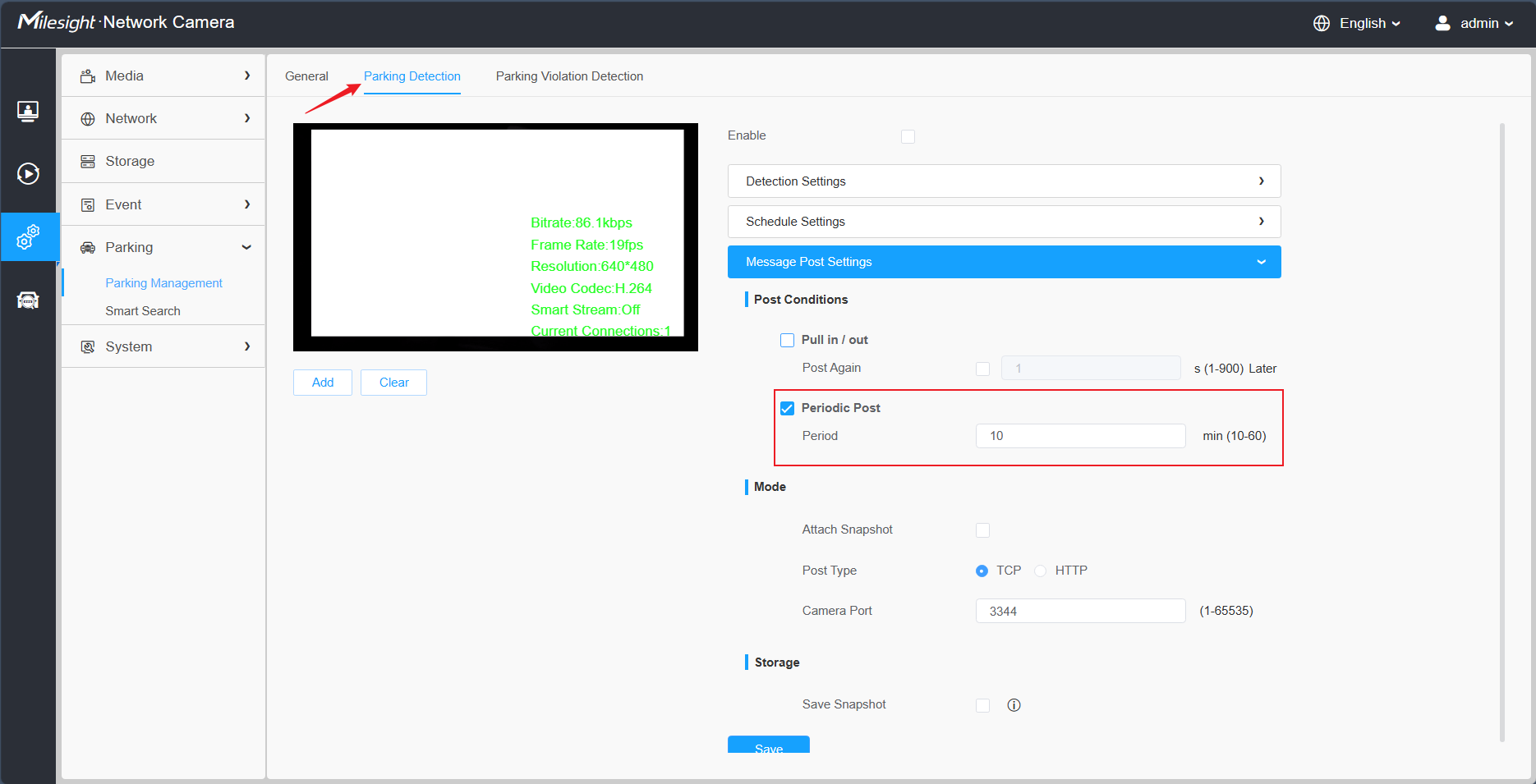
This is specifically for Parking Detection, make sure your camera’s model and firmware version support this function, as shown below:
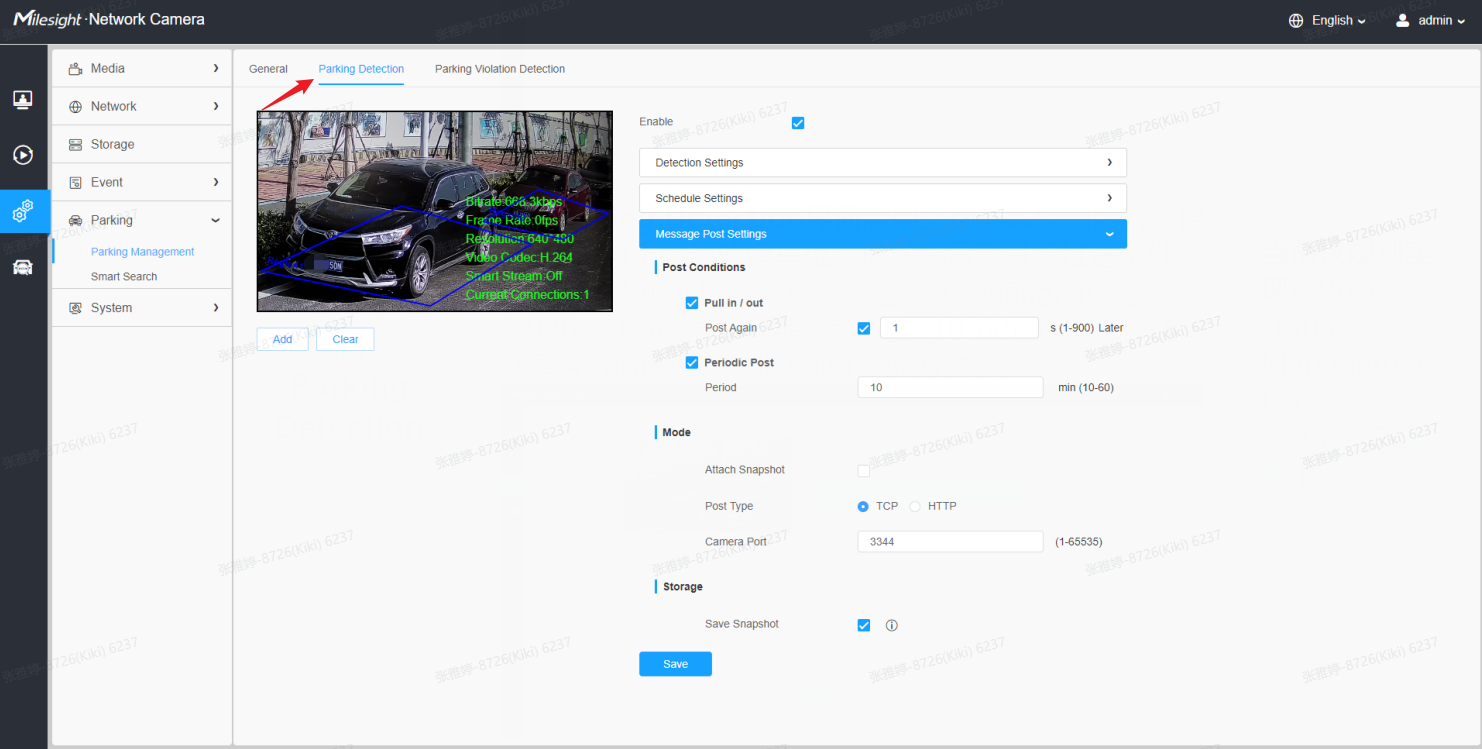
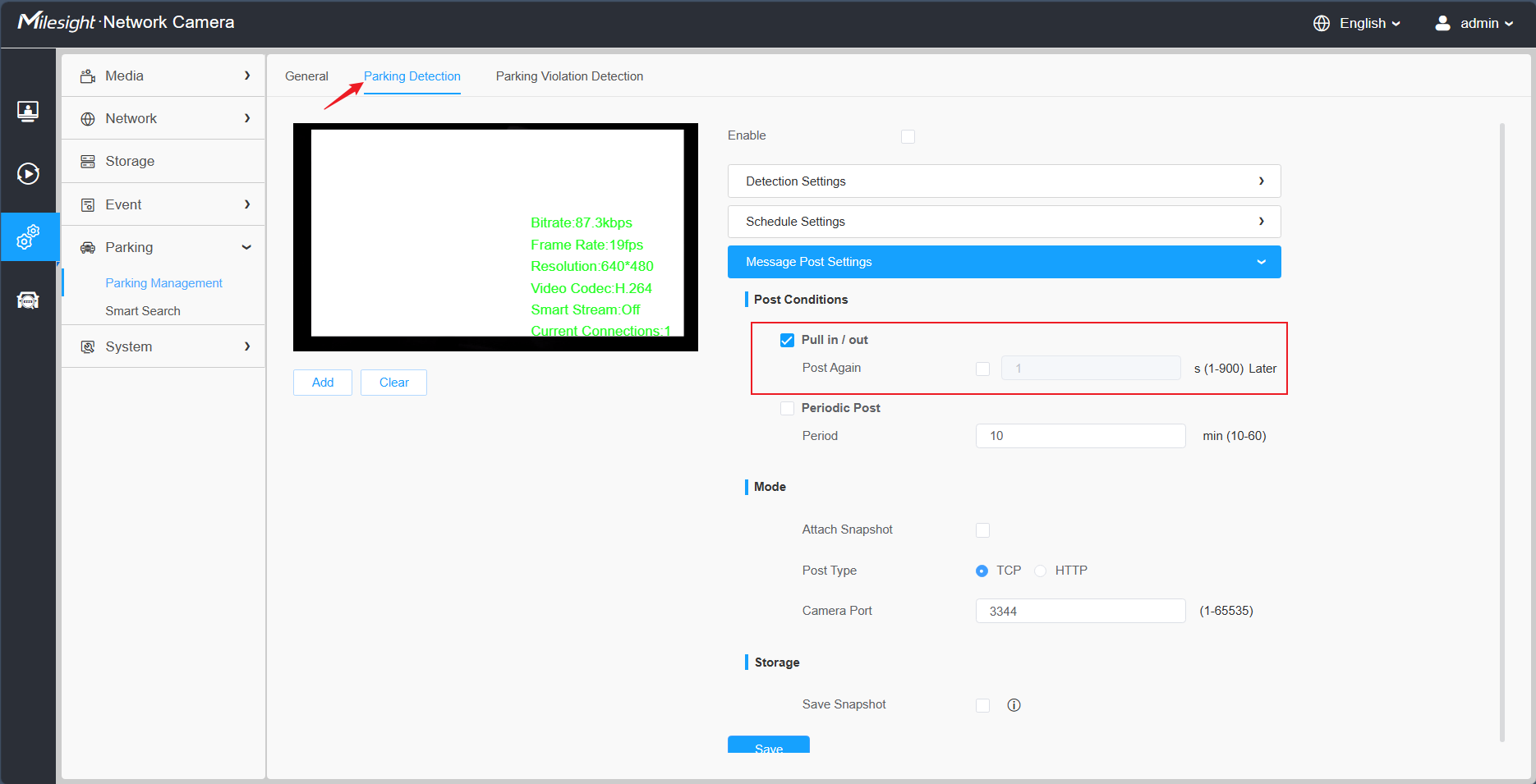
There are two post modes for the Parking Detection: Trigger mode and Period mode, please refer to the following cases:
①Trigger Mode
{
"event": "Parking Detection",
"device": "Network Camera",
"time": "2023-01-02 23:46:24",
"report_type": "trigger",
"region": 1,
"region name": "ROI1",
"state": 0,
"Length of Parking": "00:00:31",
"License Plate": "BD925RA",
"Plate Color": "Blue",
"Vehicle Type": "Car",
"Vehicle Color": "Blue",
"Vehicle Brand": "Buick",
"Object tracking box_x1": 732,
"Object tracking box_y1": 885,
"Object tracking box_x2": 1193,
"Object tracking box_y2": 1558,
"plateSnap": "....(BASE64 code)",
"bkgSnap": "....(BASE64 code)"
}
②Period Mode
{
"event": "Parking Detection",
"device": "Network Camera",
"time": "2023-01-02 23:54:54",
"report_type": "interval",
"total_occupied": 1,
"total_available": 3,
"region": [1, 2, 3, 4],
"region name": ["ROI_1", "ROI_2", "ROI_3", "ROI_4"],
"state": [1, 0, 0, 0],
"data list": [{
"region": 1,
"region name": "ROI_1",
"state": 1,
"Length of Parking": "00:00:17",
"License Plate": "DD925RA",
"Plate Color": "Blue",
"Vehicle Type": "SUV",
"Vehicle Color": "Blue",
"Vehicle Brand": "Buick",
"Object tracking box_x1": 1092,
"Object tracking box_y1": 870,
"Object tracking box_x2": 1509,
"Object tracking box_y2": 1541,
"plateSnap": "....(BASE64 code)"
},
{
"region": 2,
"region name": "ROI_2",
"state": 1,
"Length of Parking": "00:01:17",
"License Plate": "DD92AAA",
"Plate Color": "Blue",
"Vehicle Type": "SUV",
"Vehicle Color": "Blue",
"Vehicle Brand": "Buick",
"Object tracking box_x1": 1092,
"Object tracking box_y1": 870,
"Object tracking box_x2": 1509,
"Object tracking box_y2": 1541,
"plateSnap": "....(BASE64 code)"
}
],
"bkgSnap": "....(BASE64 code)"
}
- l COMM_COUNTING_POST
This is specifically for the Vehicle Counting, make sure your camera’s model and firmware version support this function, as shown below:
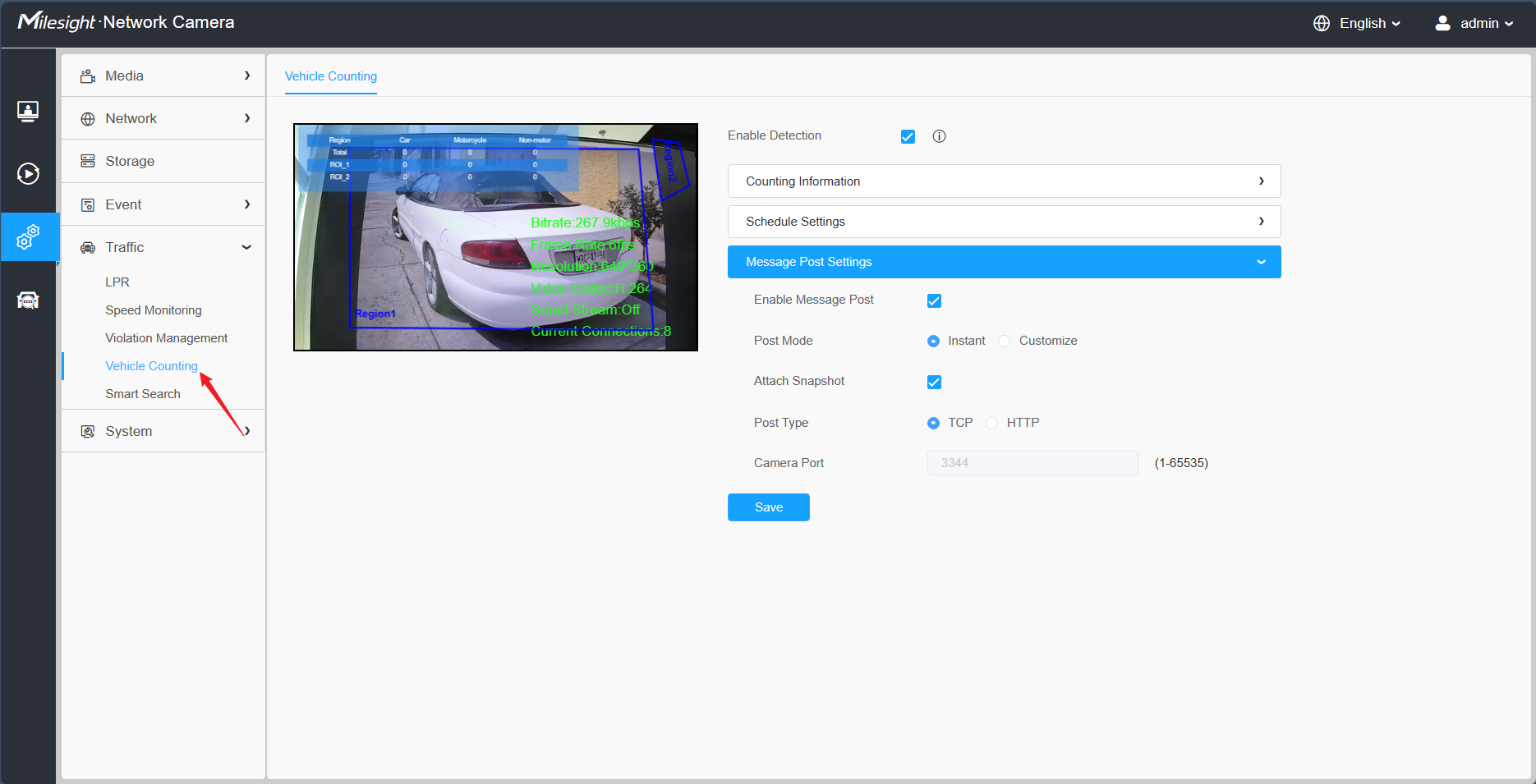
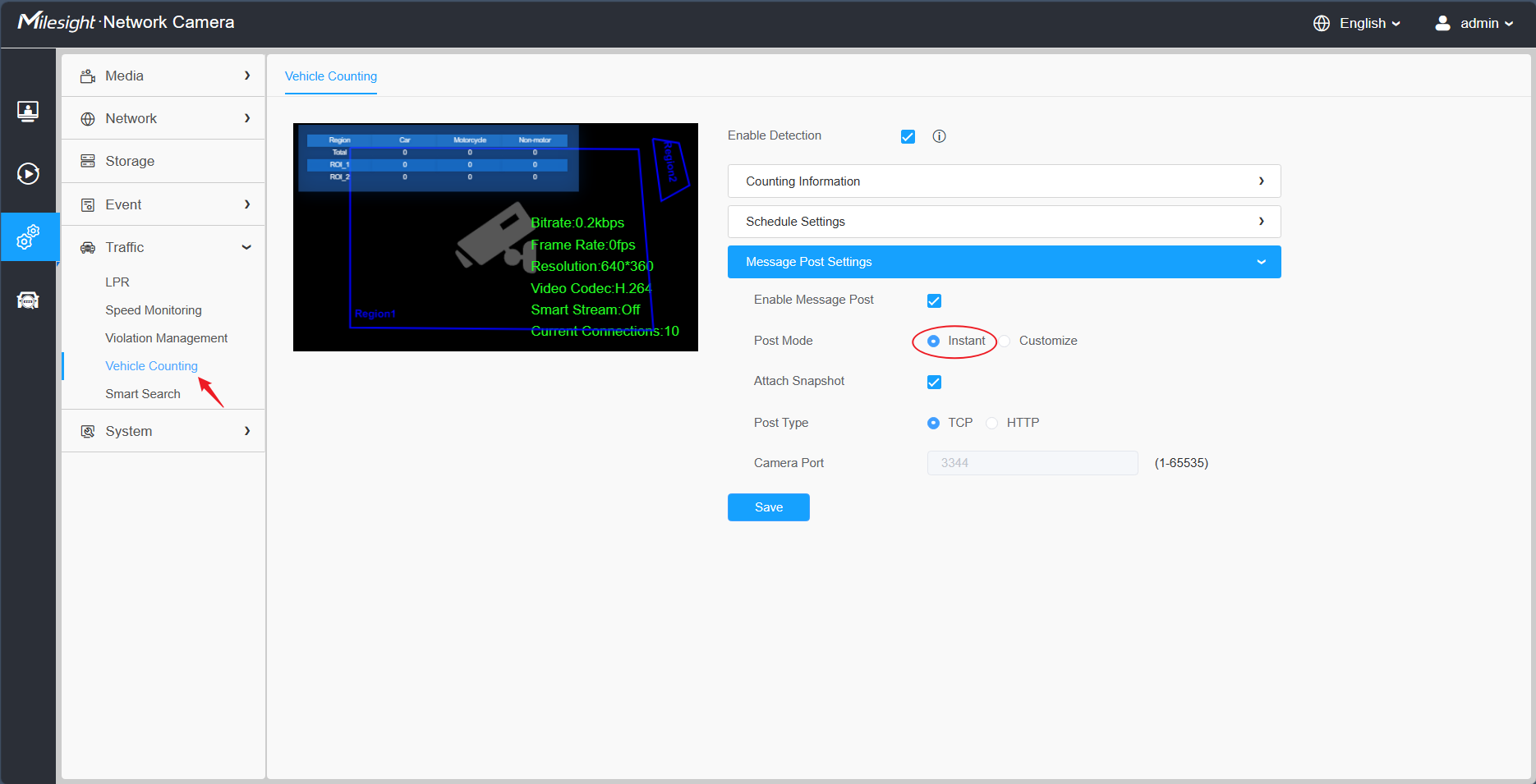
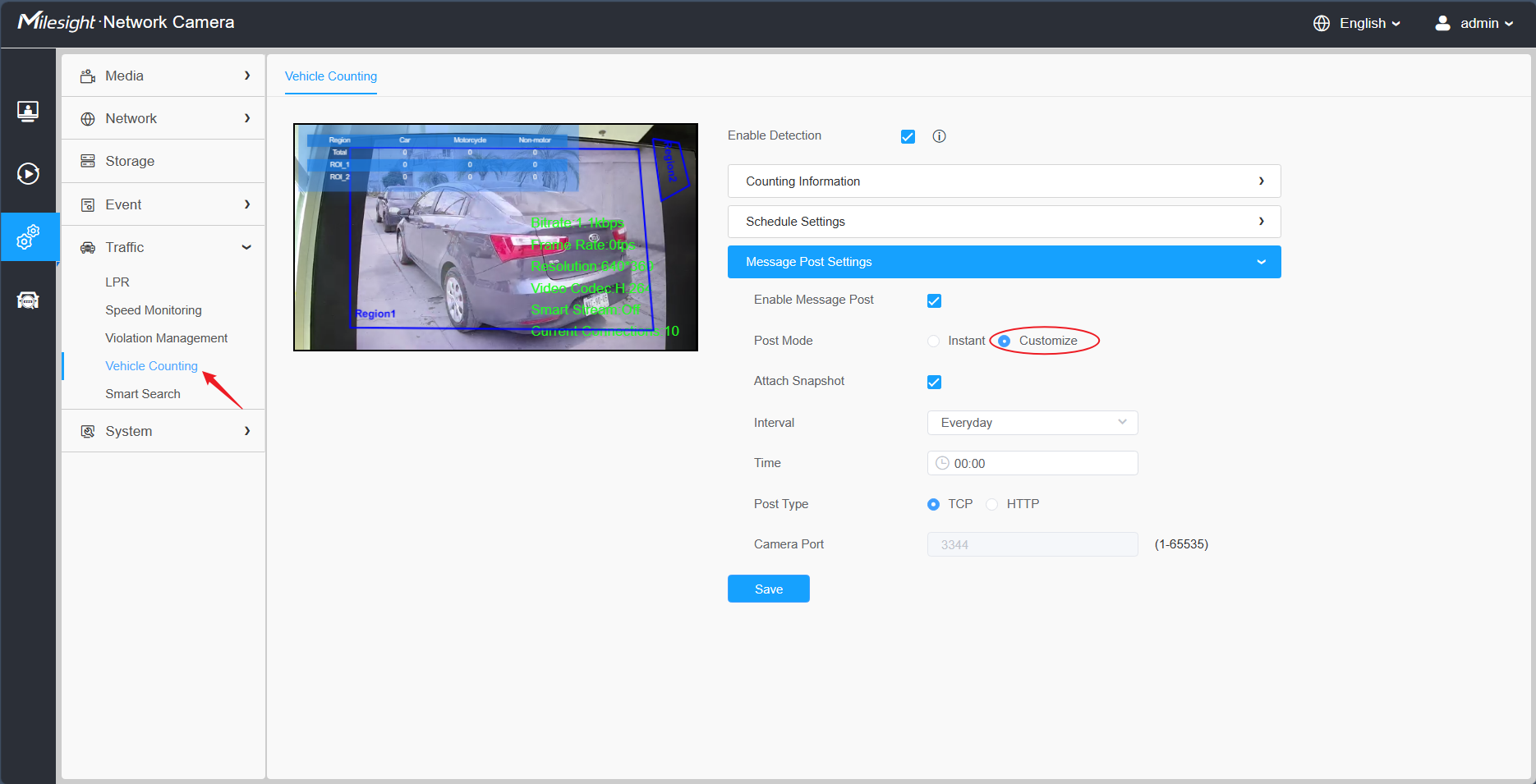
There are two post modes for the Vehicle Counting: Instant mode and Customize mode, please refer to the following cases:
①Instant Mode
{
"event": "Vehicle Counting",
"device": "Network Camera",
"time": "2023-01-03 00:28:07",
"region": 1,
"region name": "ROI_1",
"All-Car": 1,
"All-Motorcycle": 0,
"All-Non-motor": 0,
"Car": 1,
"Motorbike": 0,
"Bus": 0,
"Truck": 0,
"Van": 0,
"SUV": 0,
"Fire engine": 0,
"Ambulance": 0,
"Bicycle": 0,
"Other": 0,
"snapshot": "....(BASE64 code)"
}
②Customize Mode
{
"event": "Vehicle Counting",
"device": "Network Camera",
"time": "2023-01-03 01:00:00",
"regionList": [{
"region": 1,
"region name": "ROI_1",
"All-Car": 23,
"All-Motorcycle": 0,
"All-Non-motor": 0,
"Car": 19,
"Motorbike": 0,
"Bus": 0,
"Truck": 1,
"Van": 0,
"SUV": 3,
"Fire engine": 0,
"Ambulance": 0,
"Bicycle": 0,
"Other": 0
}, {
"region": 2,
"region name": "ROI_2",
"All-Car": 40,
"All-Motorcycle": 1,
"All-Non-motor": 0,
"Car": 35,
"Motorbike": 1,
"Bus": 2,
"Truck": 2,
"Van": 0,
"SUV": 1,
"Fire engine": 0,
"Ambulance": 0,
"Bicycle": 0,
"Other": 0
}, {
"region name": "Total",
"All-Car": 63,
"All-Motorcycle": 1,
"All-Non-motor": 0,
"Car": 54,
"Motorbike": 1,
"Bus": 2,
"Truck": 3,
"Van": 0,
"SUV": 4,
"Fire engine": 0,
"Ambulance": 0,
"Bicycle": 0,
"Other": 0
}],
"snapshot": "....(BASE64 code)"
}
Note: The three parameters in blue font in the case above are related to the configuration of "Count Type" on the page. As shown below:
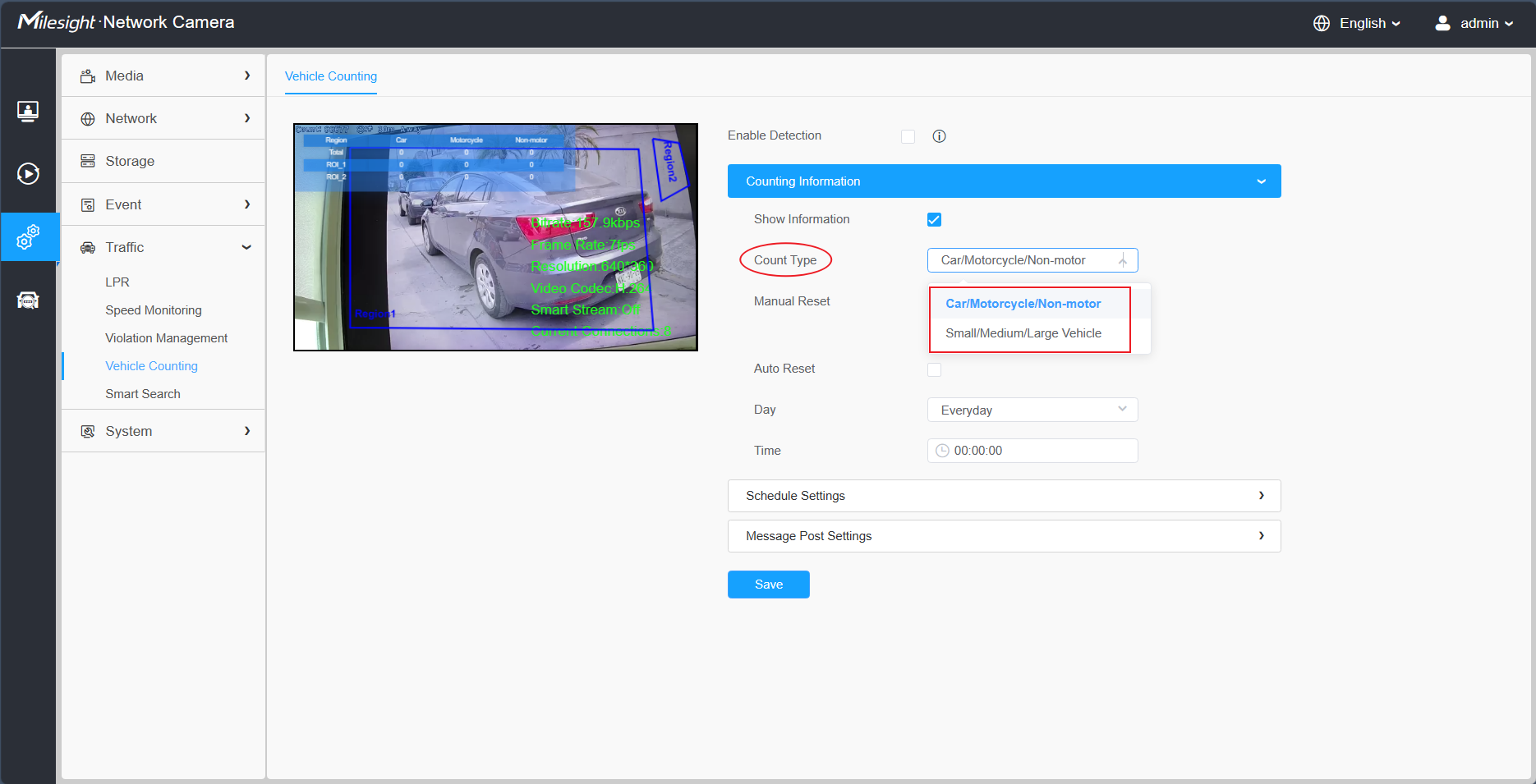
- (1) When you select "Small Vehicle/Medium Vehicle/Large Vehicle", please refer to the following case:
"Small Vehicle":0,
"Medium Vehicle":0,
"Large Vehicle":0,
- (2) When you select "Car/Motorcycle/Non-motor", please refer to the following case:
"All-Car":23,
"All-Motorcycle": 0,
"All-Non-motor": 0,
2. HTTP Type
- l Integrate Method
For the HTTP Type, currently our LPR camera supports HTTP Post and Get request method.
VMS or NVR needs to develop matched API to receive the LPR information from the camera. The matched API URL may be like below:
URL of Post Method: http://IP:Port/xxxx
URL of Get Method: http://IP:Port/xxxx?
After VMS or NVR has completed the API, our LPR camera could use the API URL to send LPR information to the VMS or NVR when the license plate is recognized.
- l LPR Information transfer
- ü Post Method
Take an example, the API URL from a VMS is like:
“http://192.168.69.28:8092/api/httpEvent”
Fill in the specified URL in camera’s web UI (if the VMS requires the authentication, please also fill in) :
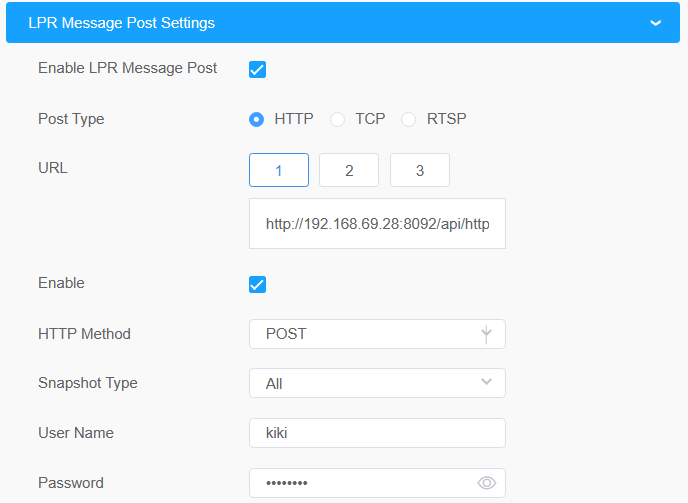
Camera will post the LPR information data in json format to the VMS or NVR in real time when it is recognized.
The content that will be sent is as follows:
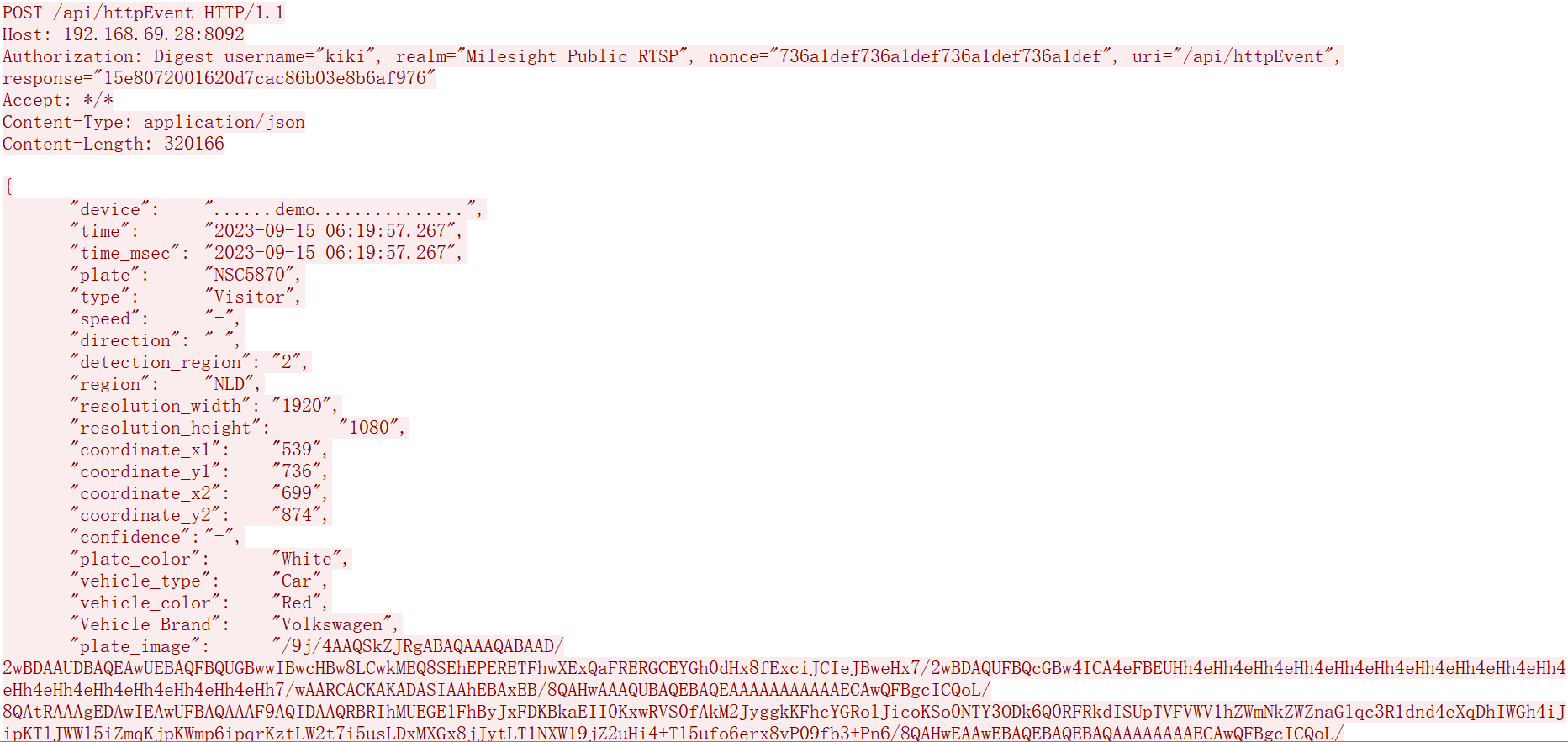
Key | Sample of Value | Description |
device | ......demo.............. | The Device Name which can be configured on the System Info of camera. The default is Network Camera. |
time | 2023-09-15 06:19:57.267 | The time when license plate is recognized. |
time_msec | 2023-09-15 06:19:57.267 | The time when license plate is recognized.(Accurate to the millisecond level.) |
plate | NSC5870 | The recognized license plate number. |
type | Visitor | The plate list type of recognized license plate, Black or White or Visitor. |
speed | - | The running speed of detected vehicle. |
direction | - | The driving direction of detected vehicle, Approach or Away. |
detection_region | 2 | The ID of detection region where the vehicle is being tested, 1 or 2 or 3 or 4. |
region | NLD | The registration country/region of the recognized license plate. |
resolution_width | 1920 | The width of LPR processing resolution. |
resolution_height | 1080 | The height of LPR processing resolution. |
coordinate_x1, coordinate_y1 | 539, 736 | The top left coordinates of license plate. |
coordinate_x2, coordinate_y2 | 699, 874 | The bottom right coordinates of license plate. |
confidence | - | The confidence value of recognized license plate. |
plate_color | White | The color of recognized license plate. |
vehicle_type | Car | The type of recognized vehicle. |
vehicle_color | Red | The color of recognized vehicle. |
Vehicle Brand | Volkswagen | The brand of recognized vehicle. |
plate_image |
| The snapshot of license Plate, depends on whether it is configured to send together. As shown below, it will be sent together if select License Plate or All. |
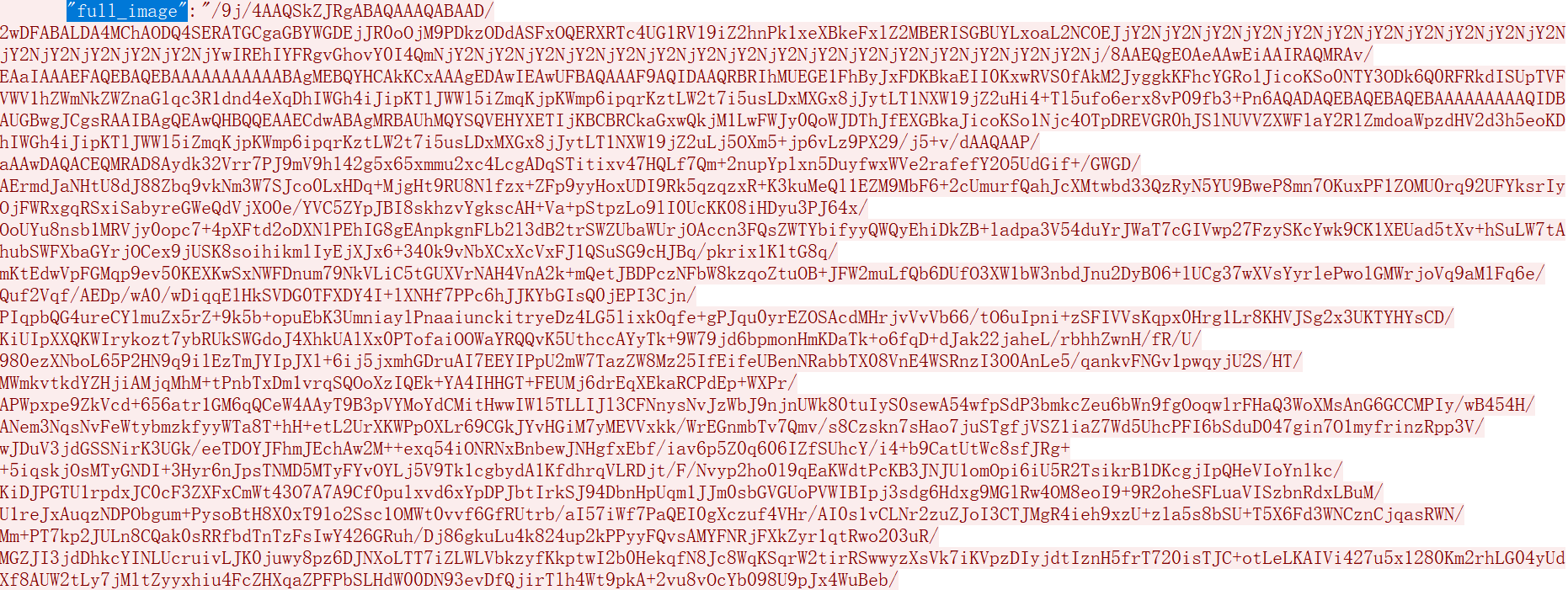
full_image |
| The full snapshot,depends on whether it is configured to send together. As shown below, it will be sent together if select Full Snapshot or All. |
evidence_image0 |
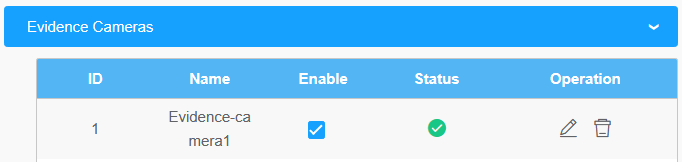
| The snapshot of license Plate from evidence camera 1, depends on whether a linkage evidence camera is added to your LPR camera. |
evidence_image1 |
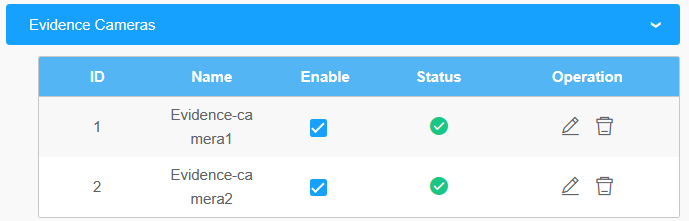
| The snapshot of license Plate from evidence camera 2, depends on whether two linkage evidence cameras are added to your LPR camera. |


Note:
- 1. The common format for field names for functions prior to version 45.8.0.3-LPR_XX-r1 is: abc_def. Such as: plate_color and vehicle_type.
- 2. The common format for field names for functions in 45.8.0.3-LPR_XX-r1 and above version is: Abc Def. Such as: Vehicle Brand and Vehicle Type.
- 3. It is recommended to capture the packet to confirm the field names of the current camera version and functions first before compatibility.
- 4. For the coordinate_x1, coordinate_y1, coordinate_x2, coordinate_y2, if the vehicle is detected but the license plate is not recognized, these parameters will not be sent.
For the Post method, if your camera’s model is TSxxxx-xxE or MS-Cxxxx-xLxE, starting from T_61.8.0.3_XX-r9, support “Post” module with unified configuration. The newly integrated “Post” module simplifies push configuration,allowing unified configuration of Post addresses for each event.
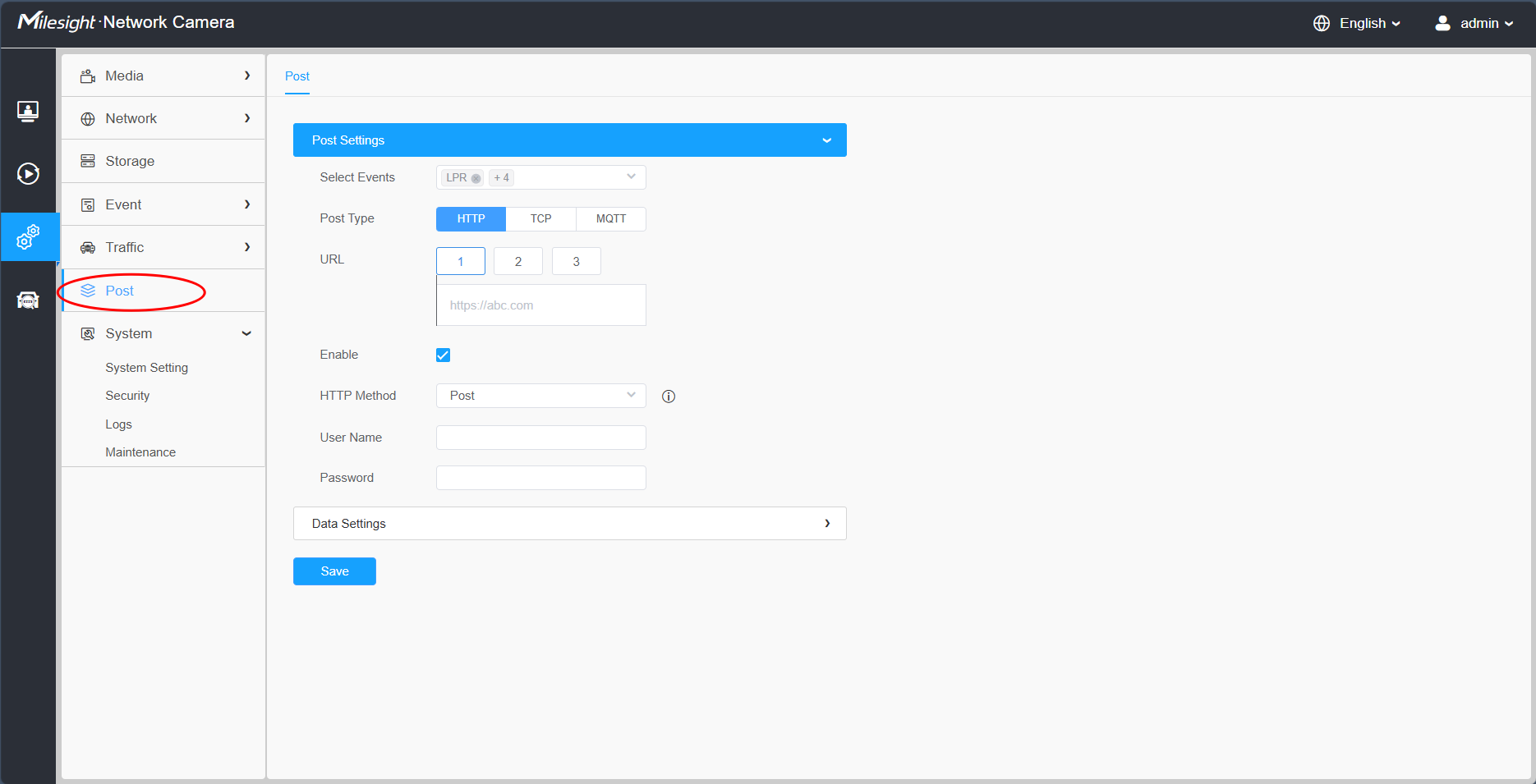
The following events are available:
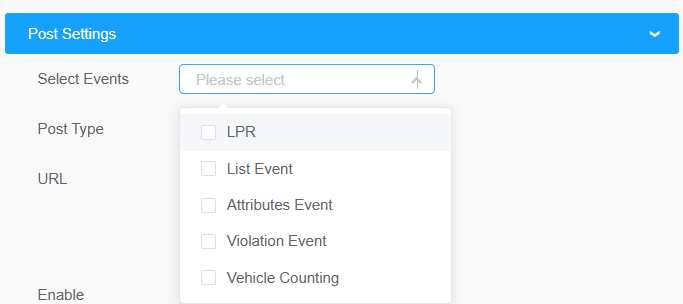
- (1) For TSxxxx-xxE models: LPR, List Event, Attributes Event, Violation Event and Vehicle Counting are optional.
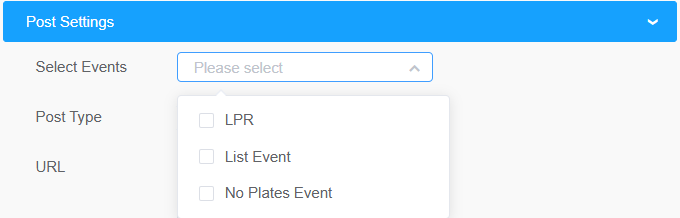
- (2) For MS-Cxxxx-xLxE models: LPR, List Event and No Plates Event are optional.
Starting from this version, support for uploading open configuration template file, you can use Data Editor to customize the fixed fields you need, and you can customize the field names to match different back-end settings, which is flexible and compatible with third-party Post in different formats, saves the workload of compatibility development, and provides a smooth push experience.
- Get Method
Take an example, the API URL from a VMS is like “http://192.168.69.28:8092/api/http”
Fill in the specified URL in camera’s web UI (if the VMS requires the authentication, please also fill in) :
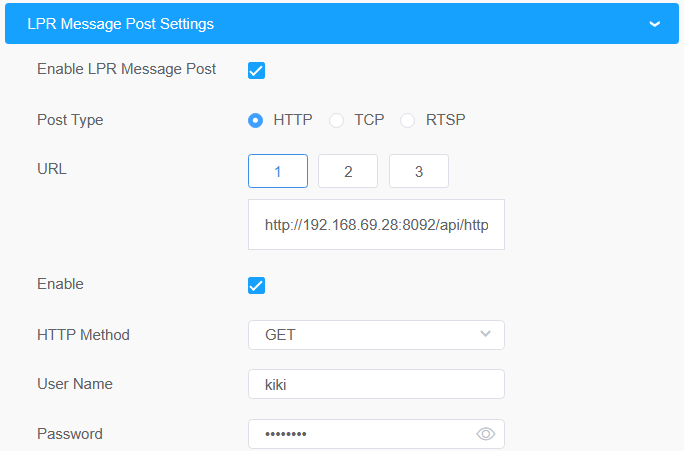
For sending the license plate information, the LPR camera will automatically add the license plate parameters to the URL.
For example, the license plate is “MS12345”. Once it’s detected, the LPR camera will send below URL to VMS:
http://192.168.69.28:8092/api/httpEventsource=LPR&description=MS12345
If the license plate information is to be displayed in VMS, the VMS side needs to extract it from the URL.
3. RTSP Type
- l Prerequisites
This part is implemented in onvif metadata. There are three streams in rtsp: video stream, audio stream, and alarm stream. Metadata alarm is performed through the onvif alarm stream in the rtsp. So if the VMS or NVR supports and can receive the onvif alarm stream in the rtsp, it can work with rtsp.
- l Integrate Method
We have defined the format of the XML. Knowing the XML format, VMS or NVR can be developed to be integrated, and LPR information can be displayed in VMS or NVR.
ex.) The contents of the xml include the date, time, license plate, and license plate snapshot paths as shown below.
<tt:MetaDataStream>
<tt:Event>
<wsnt:NotificationMessage>
<wsnt:Topic Dialect="http://www.onvif.org/ver10/tev/topicExpression/ConcreteSet">tns1:RuleEngine/LicensePlateDetector/LicensePlate</wsnt:Topic>
<wsnt:Message>
<tt:Message UtcTime="2018-05-15T06:19:34Z" PropertyOperation="Changed">
<tt:Source>
<tt:SimpleItem Name="VideoSourceConfigurationToken" Value="VideoSourceToken"/>
<tt:SimpleItem Name="VideoAnalyticsConfigurationToken" Value="VideoAnalyticsToken"/>
<tt:SimpleItem Name="Rule" Value="MyLicensePlateDetectorRule"/>
</tt:Source>
<tt:Key>
<tt:SimpleItem Name="LicensePlateResult" Value="43거6510"/>
</tt:Key>
<tt:Data>
<tt:SimpleItem Name="LicensePlatePicturePath" Value="/LPR/2018051506193401.jpg"/>
<tt:SimpleItem Name="LicenseCarSpeed" Value="25km/h"/>
<tt:SimpleItem Name="LicenseCarDirection" Value="1"/>
</tt:Data>
</tt:Message>
</wsnt:Message>
</wsnt:NotificationMessage>
</tt:Event>
</tt:MetaDataStream>
Description: You can receive the recognized license plate image through the snapshot path and the command named get ( ex. http://IP:PORT/LPR/2018051506193401.jpg). Only 10 latest images are available for download. (If you can't see image in the NVR or VMS, type url ( ex.http://IP:PORT/LPR/2018051506193401.jpg) in the web browser address box to see if the image is visible.)
- l LPR information transfer
When the integration is complete, the LPR camera sends an xml containing LPR information to the VMS or NVR in real time when it is recognized.
—END—